

Appearance
FAQ: Billing
Short answers about paying for Printer's Friend. The full guides are under Billing: Plans and prices, Your free trial, Subscription and plan changes, Payments, receipts and tax and Cancelling and the 30 day window.
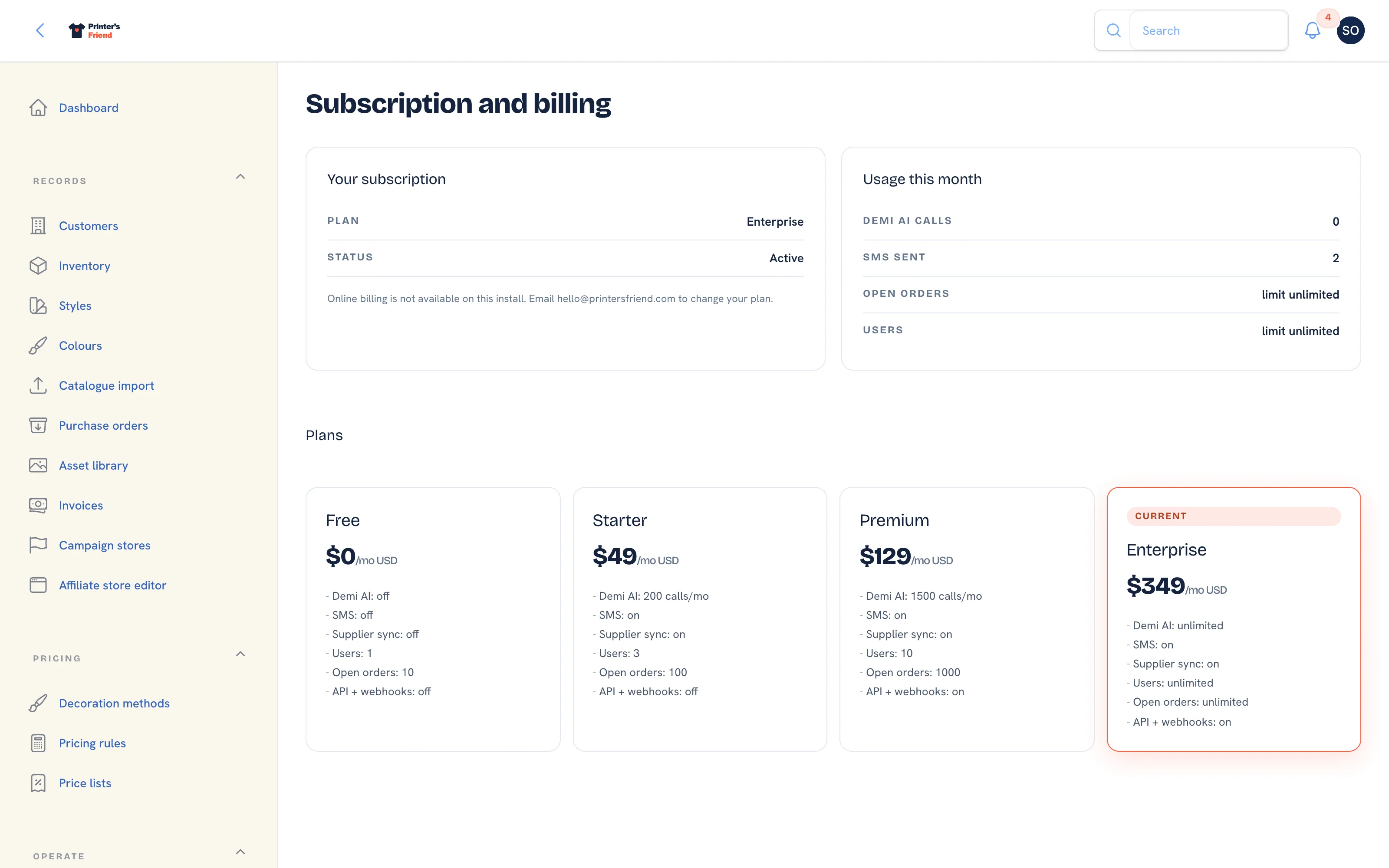 Insight, then Billing.
Paying
When is my card charged?
At the end of the 14 day trial, then monthly in advance on the same day each month. The Billing page shows the next date under Renews.
Which currency am I billed in?
The one you chose at signup: USD, AUD, EUR or GBP. It cannot change on an existing subscription. New Zealand shops are billed in AUD and Canadian shops in USD.
Is tax added?
At checkout, where Printer's Friend is registered to collect it. Checkout asks for a billing address every time and for a VAT or GST number where tax applies, so the tax invoice is correct for a business.
Where are my receipts and tax invoices?
A receipt arrives by email after every payment. Tax invoices are in Stripe's billing portal, which Manage card and invoices on the Billing page opens.
Can I pay annually, or by invoice?
No. Subscriptions are monthly by card through Stripe.
Plans
Which plan do I need?
Usually decided by how many people need a login, since every plan includes the whole product. API and webhooks need Premium. See Plans and prices.
What is an open order?
An order that has not reached Dispatched or Cancelled. Finished work never counts against the limit.
How do I change plan?
Click the plan's Switch to button under Plans on the Billing page, which opens Stripe's portal. Upgrades take effect immediately and are prorated. Downgrades take effect at the next billing cycle.
What happens if I go over a limit after a downgrade?
The action that would cross the limit is refused with a message naming the limit and the plan that lifts it. Nothing you already have is deleted.
Does Demi cost extra?
No. It is included on Starter and above with a monthly query cap, once the platform enables it.
Failed Payments
My payment failed. What happens now?
Stripe retries the card over the following days and you have a 7 day grace period during which nothing changes. The banner shows the date and an Update card button. If no payment has gone through when the grace period ends, the workspace drops to the Free tier with every record intact, and updating your card restores your plan.
Does a failed payment delete anything?
No. A failed payment never deletes anything and never starts the deletion window. Only cancelling in Stripe's portal, or an owner closing the workspace, starts the 30 day clock.
Cancelling
How do I cancel?
Manage card and invoices on the Billing page opens Stripe's portal; cancel there. The subscription ends at the end of the paid period. From then the workspace is read-only for 30 days so you can export or restart, and after that every record is permanently deleted apart from the tax records the law requires us to keep.
Do I get a refund for the rest of the month?
Partial months are not refunded unless your local consumer law requires it.
I cancelled and want to come back
Inside the 30 days, click Start subscription on the Billing page. The workspace reopens with everything exactly as you left it. After the 30 days the records are gone and cannot be restored; you would start a new workspace.
How do I close a workspace that has no subscription?
An owner clicks Close this workspace in the Billing page header and types the workspace address to confirm. The same 30 day window applies.
Access
Who can see the Billing page?
Owners and managers. Only an owner can close a workspace.
Who receives the billing emails?
The billing contact: the owner chosen with Make billing contact on their team record, or the first owner otherwise. Changing the owner's email address updates the Stripe customer as well.
My email is already in use at signup
An email address signs in to one workspace. If yours runs an active workspace the signup form names that workspace's sign-in page; if your only workspace has lapsed or been cancelled, the form sends you to restart it instead. Use a different email to open a second shop.
Related Pages
- Plans and Prices: what each plan costs and includes
- Your Free Trial: the free trial and what happens when it ends
- Subscription and Plan Changes: changing plan, and what a failed payment does
- Cancelling and the 30 Day Window: cancelling, the 30 day read-only window and deletion
- Subscription and Billing: your plan, card, usage and the plan grid