

Appearance
Asset Library
The asset library is one home for every file your shop holds: customer logos, vectors, proofs, mockups, store imagery and product photos. Files are deduplicated on upload and tagged, so the answer to whether you still have the club's vector is a search.
Where It Lives
| Page | What it's for |
|---|---|
| Records, then Asset library | Every asset with its kind, tags, customer and size |
| Upload | Add files, set their kind, customer and tags |
| Add tags | Tag the selected assets in one go |
The Library
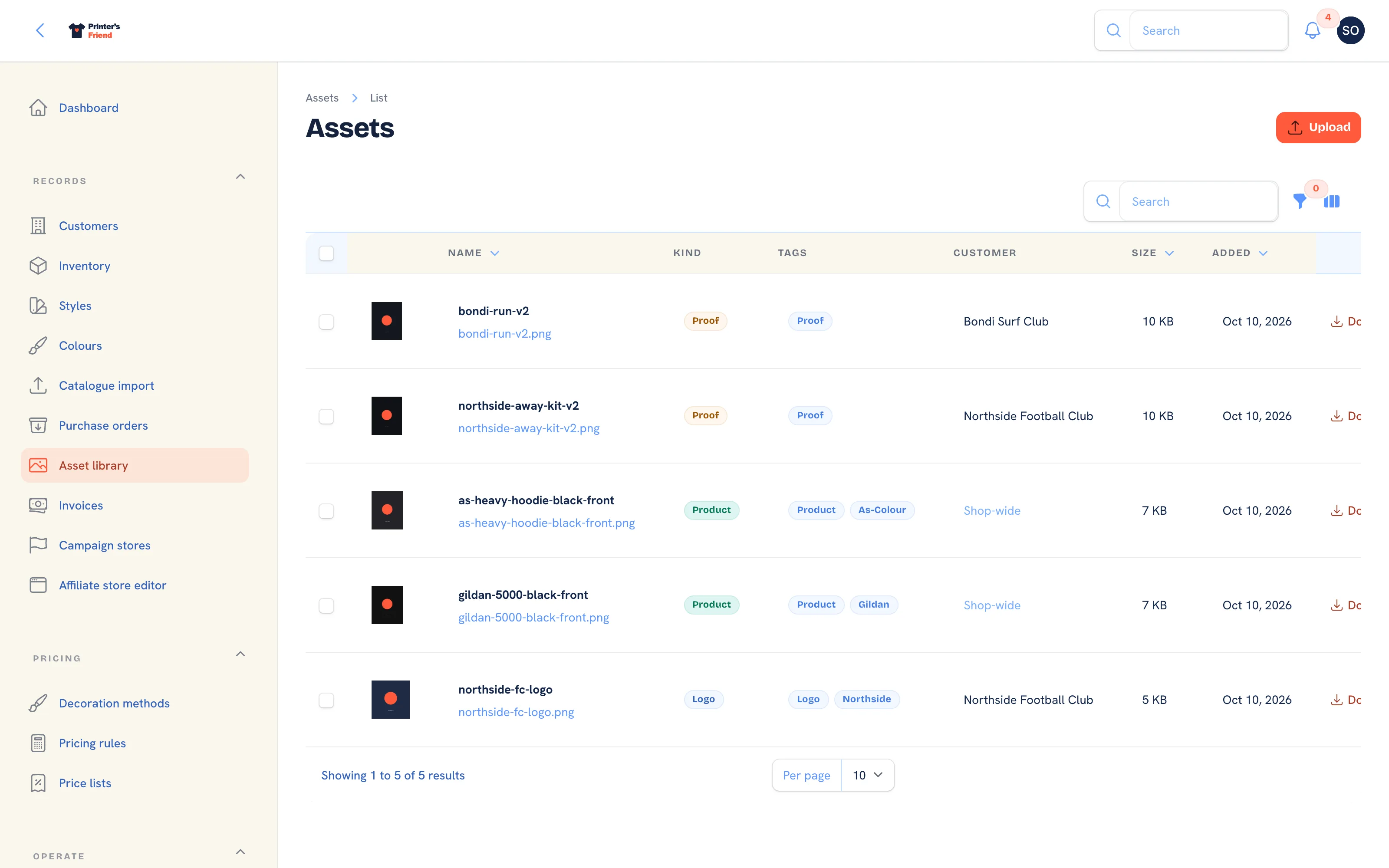 The asset library. Proofs arrive here from the order page; everything else through Upload.
Columns: a thumbnail, Name with the original filename beneath it, Kind, Tags, Customer (or "Shop-wide"), Size and Added. Filter by Kind, Tag or Customer. Each row has Download and Delete.
| Kind | Used for |
|---|---|
| Logo | Customer logos |
| Photo | General photography |
| Vector | Source artwork |
| Proof | Artwork versions uploaded on orders, tagged with the order number |
| Mockup | Rendered mockups |
| Store | Imagery for team stores and campaign pages |
| Product | Product photos shown on the shop, the portal catalogue and store tiles |
Uploading
- Click Upload.
- Choose one or more Files: PNG, JPG, GIF, WEBP, SVG, PDF, AI, EPS or PSD, up to 50 MB each.
- Pick the Kind. For Product, also pick the Product style the photo belongs to.
- Pick the Customer the files belong to, or leave it blank for shop-wide assets.
- Add Tags, for example "winter-2026" or "club-logo", and click Submit. The notification reads how many assets were added; a file that is too large or of a type not accepted is reported by name.
A file whose bytes already exist in your library becomes the same entry rather than a second copy, so uploading the same logo twice gives you one asset.
Tagging
Tick several assets, open the bulk actions menu and choose Add tags. The tags are added to every selected asset without removing existing ones. Search is only as good as your tags: tag customer logos with the customer name and source vectors with the design.
Where Assets Are Used
| Used by | How |
|---|---|
| Artwork versions | Each proof uploaded on an order is an asset of the Proof kind, and the approval page shows its preview |
| Customer designs | Mockups rendered from the online designer are filed as proofs when a quote converts |
| Shop, portal catalogue and stores | Product and Store assets provide the tiles and photos |
Who Can Fetch a File
Files sit on private storage and are served only to a requester the system can vouch for:
| Requester | Can fetch |
|---|---|
| Staff signed in to the workspace | Any asset in your workspace |
| A customer signed in to the portal | Assets filed against their own organisation, plus your Product and Store imagery. Anything else is a 404 |
| Anyone with a signed link | Only the asset the link was signed for, until the link expires. Approval pages and storefront tiles use these |
Deleting
Delete removes the asset and its files from disk. An artwork version or a design that still references it will show a broken preview afterwards, so delete only what nothing uses. Keep source vectors and proofs; forty renders of the same tee can go.
Who Can Do What
Owners, managers, sales and designers upload, tag and delete. Production and viewers can browse and download. Roles are set in Team and permissions.
Related Pages
- Artwork and Approvals: upload proofs, send approval links and handle change requests
- Public Shop: the public catalogue at /shop and where a visitor is sent to order
- Catalogue and SKUs: import brands, styles, colourways and SKUs from a CSV
- Team and Permissions: roles, rates, deactivating leavers and the owner rules