

Appearance
How the Shop Model Works
Everything in the workspace is built from a small set of objects, and most confusion during setup comes from mixing two of them up. Ten minutes here saves an hour of guessing later.
Customers
| Object | What it is | Example |
|---|---|---|
| Organisation | The customer. Holds the price list, payment terms, default carrier and addresses | Northside Football Club |
| Contact | A person at that organisation. One is the primary contact | Megan Cole |
| Portal user | A login for the customer portal, created by inviting a contact and tied to one organisation | megan@northsidefc.au |
| Address | A billing or shipping address on the organisation, with one default of each | Club rooms, 12 Park Rd |
A contact is not a login. Creating a contact lets you quote and invoice a person; Invite to portal on that contact creates the portal user that lets them sign in. Payment terms are a fixed set, Net 7, Net 14, Net 30, Net 60, End of month and Cash on delivery, and the invoice due date is computed from them.
Walk-in customers still become an organisation. The kiosk creates one named after the person, which keeps their history, reorders and invoices attached to something.
Product
Blanks are described in layers, and SKUs are what stock attaches to.
Brand          Gildan
  Style          5000 Heavy Cotton Tee
    Colour         Black
      Size           L
= SKU GIL-5000-BLK-L <- stock lives here| Object | What it is |
|---|---|
| Brand | The blanks manufacturer, with a code of up to 8 characters used in SKU codes |
| Style | A garment within a brand: the supplier's style code, a name, a list unit price and a category |
| Colour | A colour shared across styles, with a code used in SKU codes and a swatch shown on the kiosk, the portal and the designer |
| Size | XS to 3XL are seeded for every new workspace; imports add more |
| SKU | One style in one colour and size. Carries on-hand, reserved, reorder point and reorder quantity |
| Category | A grouping for the storefront and the portal catalogue: tees, hoodies, caps |
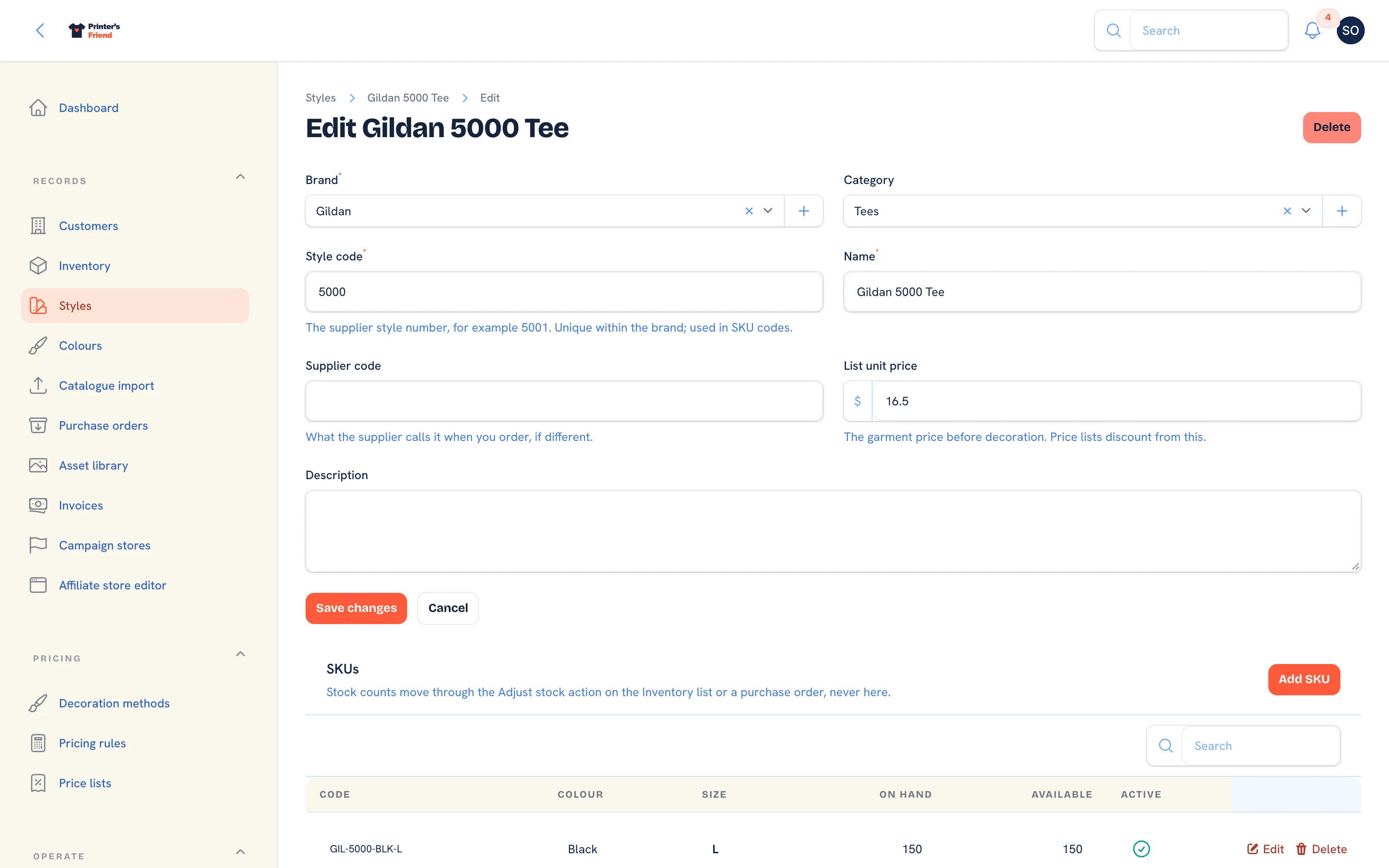 A style and its SKUs. Stock is never edited here; it moves through adjustments and purchase orders.
Stock is never a single number that gets overwritten. Every movement writes a row to a ledger, so on-hand is always explainable.
Decoration and Price
| Object | What it is |
|---|---|
| Decoration method | Screen print, embroidery, DTG, DTF, heat transfer, sublimation. Carries a setup fee and a rate matrix by quantity and colour count |
| Price list | A named rate band. Its discount percentage comes off list prices wherever that customer is priced: quotes, portal, store and cart |
| Pricing rule | A customer discount, a quantity break or a setup fee waiver, scoped to the whole shop, one customer or a price list |
| Coupon code | A code a customer enters at checkout |
| Promotion | An automatic offer applied when its conditions are met |
Set these up in this order: decoration methods, then price lists, then rules on top. The order is explained in Pricing rules.
The Job
Quote -> Order -> production stages -> Dispatched -> Invoice -> Paid| Object | What it is |
|---|---|
| Quote | Priced lines, not yet committed. Draft, Sent, Converted, Declined or Expired |
| Quote line | One garment plus decoration plus quantity, priced by the engine |
| Order | A committed job with a stage, a due date, addresses, stage history and a sales rep |
| Order line | The same shape as a quote line, plus cost snapshots taken when the order was created |
| Artwork | The proof thread on an order, with versions, comments and an approval state |
| Production batch | Several orders ganged together for one press run |
| Time entry | One clock-on against one order, costed at that person's labour rate |
| Invoice | Issued from an order: a deposit, a full invoice or the balance at dispatch, with a pay link when Stripe is connected |
| Return | Goods back in, with a refund or a credit note |
Two things are snapshotted on purpose:
- Garment and decoration costs are copied onto each order line when the order is created. A supplier price rise next month does not rewrite the margin of a job that shipped.
- The labour rate is frozen when a clock starts, and the commission rate when a rep is assigned, so a pay rise later never changes last month's job costs.
Production Stages
An order's stage is the column it sits in on the production board. There are five, in a fixed order:
Artwork Print queue In production QC + Pack Dispatched
An accepted quote becomes an order in Artwork. Approval moves it to Print queue. Entering In production consumes stock. Dispatched issues the invoice and closes the job. A cancelled order leaves the board and releases its stock. See Production workflow stages.
Selling Surfaces
| Object | What it is | Address |
|---|---|---|
| Customer portal | Reorders, approvals, invoices and messages for a signed-in customer | yourshop.printersfriend.com/portal |
| Team store | A branded store for one club or company with guest checkout | yourshop.printersfriend.com/store/{team} |
| Campaign page | A group buy with a deadline | yourshop.printersfriend.com/campaign/{slug} |
| Kiosk | In-store iPad self-serve, switched on with a PIN | yourshop.printersfriend.com/workspace/kiosk |
All of them end in the same place: a quote or an order in your workspace, priced by the same engine as a staff quote.
Your Shop and Your Team
| Object | What it is |
|---|---|
| Workspace | Your whole shop, at its own address. Everything above belongs to exactly one workspace |
| User | A staff login with a role, a labour rate and a commission rate |
| Role | Owner, manager, sales, production, designer, finance or viewer. Decides which screens and actions are available |
| Setting | A stored preference: brand name, accent colour, tax scheme, portal copy, kiosk PIN |
| Time zone | Set per workspace. Due dates, today tables, clock-in times and the morning reminder sends follow it; records are stored in UTC |
Roles are covered in Your team and roles. Give people the narrowest role that lets them do their job, and use viewer for anyone who only needs to look.
Related Pages
- Your First Job, End to End: one job through every screen it touches
- Pricing Rules: customer discounts, quantity breaks and setup waivers
- Production Workflow Stages: the five production stages and the chase timings
- Your Team and Roles: invite your team and choose their roles at setup
- Glossary: the terms used in the product and these docs