

Appearance
Daily Rhythm
Setup is done once. This section covers the screens you use every day. The product is built around one loop, and every step writes to the same record, so nothing is retyped between a quote and the paid invoice.
enquiry -> quote -> order -> artwork approved -> print -> QC -> dispatch -> invoice -> paidWhere It Lives
The workspace sidebar groups the daily screens under Operate and Records. The dashboard sits above both.
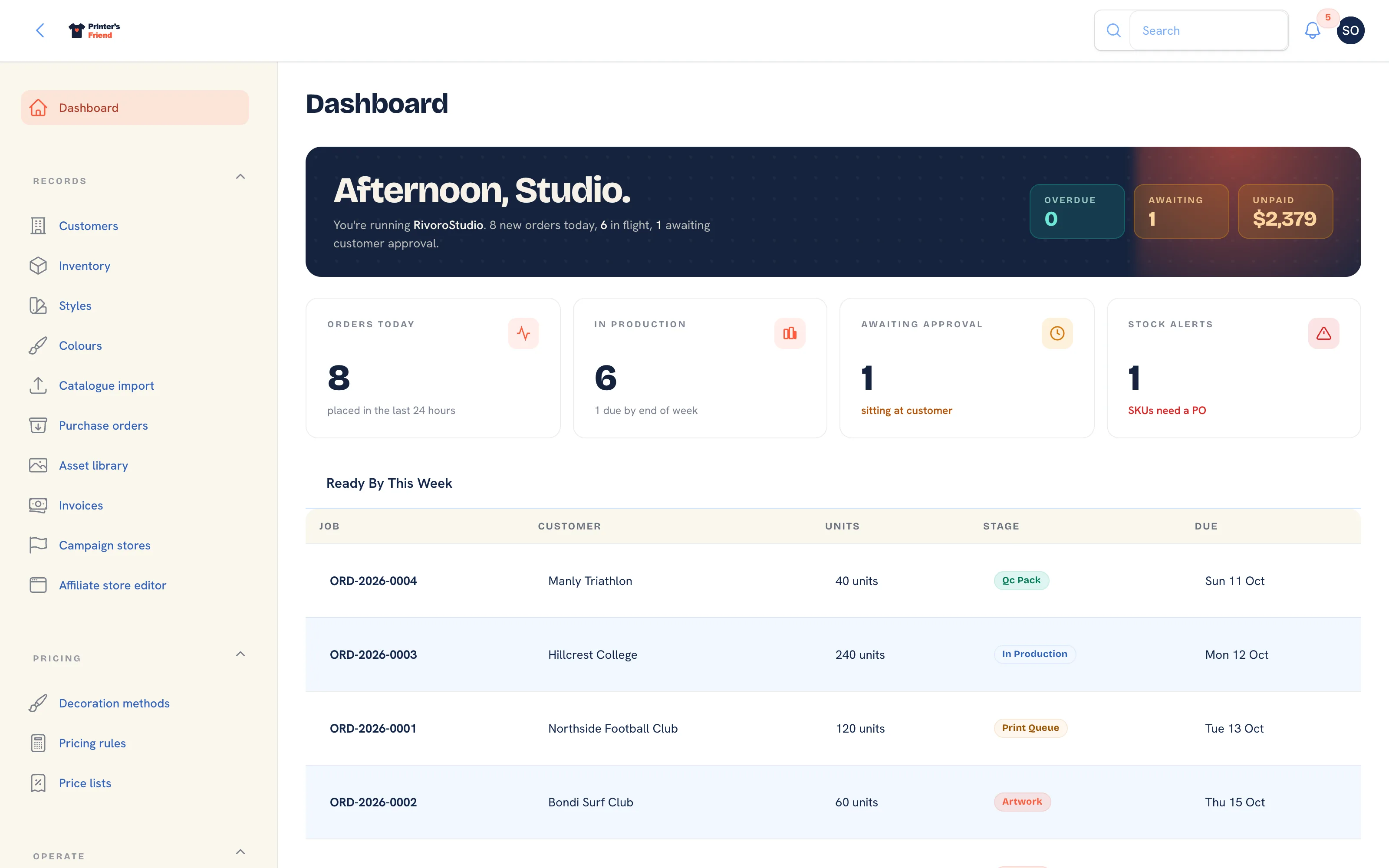 The dashboard, with the sidebar that holds every daily screen.
| Page | Menu | What it's for |
|---|---|---|
| Dashboard | Dashboard | The morning view: late jobs, proofs waiting on customers, cash and capacity |
| Quotes | Operate, then Quotes | Price a job, send it, chase it, convert it to an order |
| Orders | Operate, then Orders | Work a committed job from artwork to dispatch, print its documents, issue its invoice |
| Production board | Operate, then Production | Move jobs between stages by drag, tap or barcode scan, and put a board on the wall |
| Batch production | Operate, then Batch production | Plan a press run that covers several orders |
| Artwork and approvals | On each order | Upload proofs, send one-click approval links, handle change requests |
| Time on jobs | Operate, then Time on jobs | Staff hours clocked against jobs, costed at each person's rate |
| Inventory | Records, then Inventory | Blanks stock with a movement ledger, reorder points and shelf labels |
| Cycle counts | Operate, then Cycle counts | Count a rack and post every variance through the ledger |
| Purchase orders | Records, then Purchase orders | Order blanks from suppliers and receive deliveries into stock |
| Invoices | Records, then Invoices | Invoices, reminders, payments, refunds and credit notes |
| Payments and deposits | On each order and invoice | Deposits before dispatch, pay links, manual payments and refunds |
| Addresses and packing slips | On each customer and order | Billing and shipping addresses, the packing slip and the shipping label |
| Returns | Operate, then Returns | Goods coming back: receive, refund, credit or reject |
| Customers | Records, then Customers | The customer record, contacts, portal logins and addresses |
| Messages | Operate, then Messages | Conversations started by customers in the portal |
| Asset library | Records, then Asset library | Every logo, proof, vector and product photo your shop holds |
A Day in the Shop
| When | Who | What |
|---|---|---|
| Open up | Owner or manager | Dashboard: what is late, what is due, what is waiting on a customer |
| Morning | Sales | Quotes: new enquiries out, change requests answered |
| Morning | Art | Artwork: proofs out, approvals in, revisions turned around |
| All day | Floor | Production board or an operator station, advancing jobs by scan, drag or tap |
| All day | Floor | Time clock on and off jobs |
| As stock lands | Production | Purchase orders: receive deliveries |
| Afternoon | Packing | QC, pack, print the packing slip, dispatch. Dispatch issues the invoice |
| Weekly | Finance | Invoices: record bank payments, check what is overdue |
| Weekly | Production | Inventory: low stock, suggested purchase orders |
| Monthly | Owner | Reports: margin, labour, commission, top customers |
What Happens on Its Own
Once the shop is set up, these run without anyone clicking anything. Each one is covered on its page.
| Trigger | What happens |
|---|---|
| A quote is marked sent | The customer gets the quote email with the PDF and signed Accept this quote and Request changes links, valid for 30 days |
| A sent quote is unanswered for 7 days | One follow-up email. A second nudge goes out in the 5 days before the quote expires. Nothing is sent after expiry |
| A customer accepts from the link | The order is created in the Artwork stage, stock is reserved and staff with access to quotes are notified |
| A proof is sent for approval | The customer gets a signed approval link valid for 7 days, by email and by SMS where SMS is available |
| A proof is unanswered for 3 days | A chase email with a fresh link. A second chase 3 days later. Then a task for staff and no more emails |
| A customer approves a proof | The job moves to the print queue, a thank-you email goes out and the rep on the order is notified |
| An order enters the print queue | An SMS tells the customer the job is approved and queued, where SMS is available |
| An order enters production | Stock for its SKUs is consumed and written to the movement ledger |
| An order is dispatched | The dispatch email and SMS go out with tracking, and the invoice for whatever is still owed is issued and emailed |
| An invoice is issued | A Stripe pay link is created where Stripe is connected, the email carries it, and a connected ledger receives the invoice |
| An invoice falls due | Reminders 3 days before the due date, on the due date, 7 days after and 14 days after, then nothing |
| Any stage change | A stage history row is written, every open board updates within fifteen seconds and webhook subscribers are notified |
| A SKU reaches its reorder point | It is flagged in Inventory and Suggest from low stock will draft a purchase order for it |
Who Gets Told
Staff notifications appear under the bell in the workspace and by email. A customer approving a proof, requesting a change, accepting a quote or asking for a quote change notifies the rep on the job, or every active staff member with access to orders or quotes when there is no rep. Orders that arrive from a store, a campaign, the portal cart or the kiosk notify staff the same way, and a customer posting in the portal notifies every active staff member.
When Customer Emails Go Out
The chase and reminder emails run on your shop's clock, set in Brand and portal settings. Invoice reminders go at 9:00, quote follow-ups at 9:30 and artwork chases at 10:00, in your timezone. Late badges, "today" tables and the time clock use the same timezone.
The Three Screens Most Shops Live In
The Dashboard in the morning answers what to worry about today in one view. The Production board during the day is where jobs move, and every move is recorded with who and when. Quotes is where you go when the phone rings; with pricing rules in place a quote is a customer, some lines and a date.
Keeping the Data Honest
- Advance jobs when they move, not at the end of the day. The board, the customer emails and the stock ledger are only true if the stage is.
- Never type over an on-hand count. Use Adjust stock with a reason, or run a cycle count, so every unit is explained by a movement.
- Clock on and off jobs. Without hours, margin in Reports is gross margin only.
- Keep a contact with an email address on every customer. Quotes, proofs and invoices go to the order's contact, and a missing email stops the send.
Related Pages
- Dashboard: the morning view: late jobs, proofs waiting on customers, cash and capacity
- Quotes: build, price, send, chase and convert quotes
- Orders: the order page, stage moves and what each one triggers
- Production Board: move jobs between stages by drag, tap or barcode scan
- Invoices: invoices, reminders, payments, refunds and credit notes
- Your First Job, End to End: one job through every screen it touches