

Appearance
What Printer's Friend Does
Printer's Friend runs a garment decoration shop: screen print, DTG, DTF, embroidery, heat transfer and sublimation. One workspace holds your prices, your blanks, your customers, your jobs, your invoices and the screens on your shop floor.
A quote becomes an order, the order crosses the production board, dispatch issues the invoice, and the customer pays through a hosted Stripe link. Every step writes to the same record, so nothing is retyped between systems.
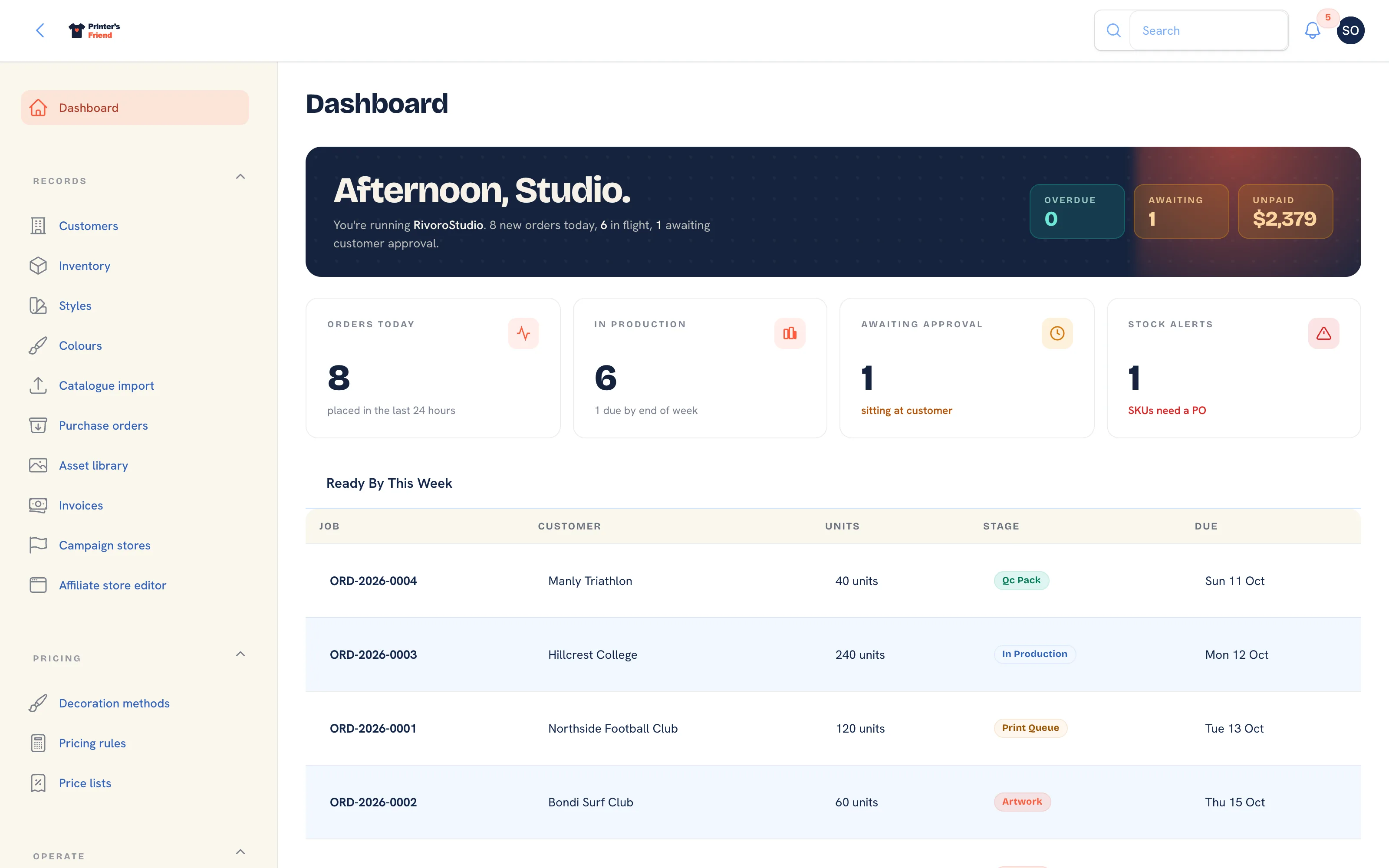 The dashboard is the first screen after sign-in once the setup wizard is finished.
Where It Lives
| Page | What it's for |
|---|---|
| How the shop model works | The objects the workspace is built from and how they relate |
| Create your account | The trial, the card held at checkout, the welcome link and your workspace address |
| The setup wizard | The five steps a new workspace opens on |
| Your first job, end to end | One job through every screen it touches |
| Plans and limits | What each plan includes and what happens when a subscription lapses |
| What you need before you start | Devices, accounts and information to have ready |
The Four Surfaces
Every shop has its own address, yourshop.printersfriend.com, and everything below lives on it.
| Surface | Who uses it | Address |
|---|---|---|
| Workspace | You and your staff | yourshop.printersfriend.com/app |
| Shop floor screens | Press operators, packers, QC | /workspace/floor-board, /workspace/operator/printer, /workspace/scan, /workspace/timeclock |
| Customer portal | Your customers | yourshop.printersfriend.com/portal |
| Public storefronts | Anyone with the link | /store/{team}, /campaign/{slug}, and the walk-in kiosk at /workspace/kiosk once you switch it on |
The workspace is where nearly everything in these guides happens. Its sidebar is grouped, and the guides name the groups constantly.
| Group | What is in it |
|---|---|
| Getting started | The setup wizard. It stays in the menu until you finish or skip it, and for as long as sample data is loaded |
| Records | Customers, Inventory, Styles, Colours, Catalogue import, Purchase orders, Asset library, Invoices, Campaign stores, Affiliate store editor |
| Pricing | Decoration methods, Pricing rules, Price lists |
| Operate | Quotes, Orders, Time on jobs, Production, Batch production, Cycle counts, Returns, Messages |
| Insight | Reports, Demi (AI), Coupon codes, Promotions, Email broadcasts, Email & SMS templates, Brand & portal, Invoice template, Integrations, Billing, Audit log, API tokens, Webhook subscribers, Workflow stages |
| Settings | Team |
Billing, Team, Integrations, the settings pages and everything under Pricing are visible to owners and managers only. The rest depends on the person's role; see Your team and roles.
What Ships Today
Every plan includes quotes, orders, the production board, artwork approvals, the customer portal, the walk-in kiosk, time tracking, sales commission, team stores, campaign pages, silhouette mockups, the online designer, inventory, purchase orders, CSV catalogue import, invoicing, branded email, nightly encrypted backups and CSV export of customer activity.
Some capabilities need an account of your own before they do anything: Stripe payment links need your Stripe account, SMS needs your Twilio account, and Australia Post labels need your eParcel account. All three are connected under Insight, then Integrations. The REST API and outbound webhooks are on Premium and above. Demi, the assistant, answers once the platform's AI key is in place and says so until then. Xero and QuickBooks sync appear on the Integrations page once the platform's developer apps exist; until then the card says the sync is not available yet.
Two things are still planned: a live AS Colour catalogue sync, and importing past orders from another system. Today every supplier's range comes in through the CSV import, and order history stays in the old system for reference.
What It Does Not Do
- It is not an accounting package. It issues and tracks invoices and, when connected, pushes them to Xero or QuickBooks. Your accountant keeps the ledger.
- It is not an art studio. It handles artwork versions, proofs, approvals and export, and the online designer covers text, shape and image layers on a garment preview. Separations and digitising still happen in your art software.
- It does not run your press. It tells the floor what to print and records what happened.
Where to Go Next
- How the shop model works for the vocabulary before you click anything.
- Create your account to start a workspace.
- The installation guide when you are ready to set the shop up properly.
Related Pages
- How the Shop Model Works: the shop model: customers, quotes, orders, stages and stock
- Create Your Account: create your workspace
- Your First Job, End to End: one job through every screen it touches
- Setup Overview and Checklist: the fifteen step installation guide
- Plans and Limits: the limits on each plan and what happens at them