

Appearance
Brand and Portal Settings
Brand and portal settings is the one page for everything a customer sees about your identity: the shop name, accent colour and contact details on the portal, emails and PDFs; the tax label, rate and currency on every document; the portal's welcome copy and toggles; your time zone; the sender address for carrier labels; and the walk-in kiosk switch. Changes apply as soon as you save.
Where It Lives
| Page | What it's for |
|---|---|
| Insight, then Brand & portal | The page described here |
| Insight, then Invoice template | The invoice PDF's business name, tax number, notes and payment instructions. See Invoice template |
| Insight, then Workflow stages | Production stage names and chase timings. See Production workflow stages |
The page is available to owners and managers. The install guide walks through it as step 1 and step 2; this page is the field reference.
Saving
Every section on the page saves together with the Save button at the top right. A Brand settings saved notice confirms it. Validation failures name the field, and the kiosk section reports separately when it refuses to switch on.
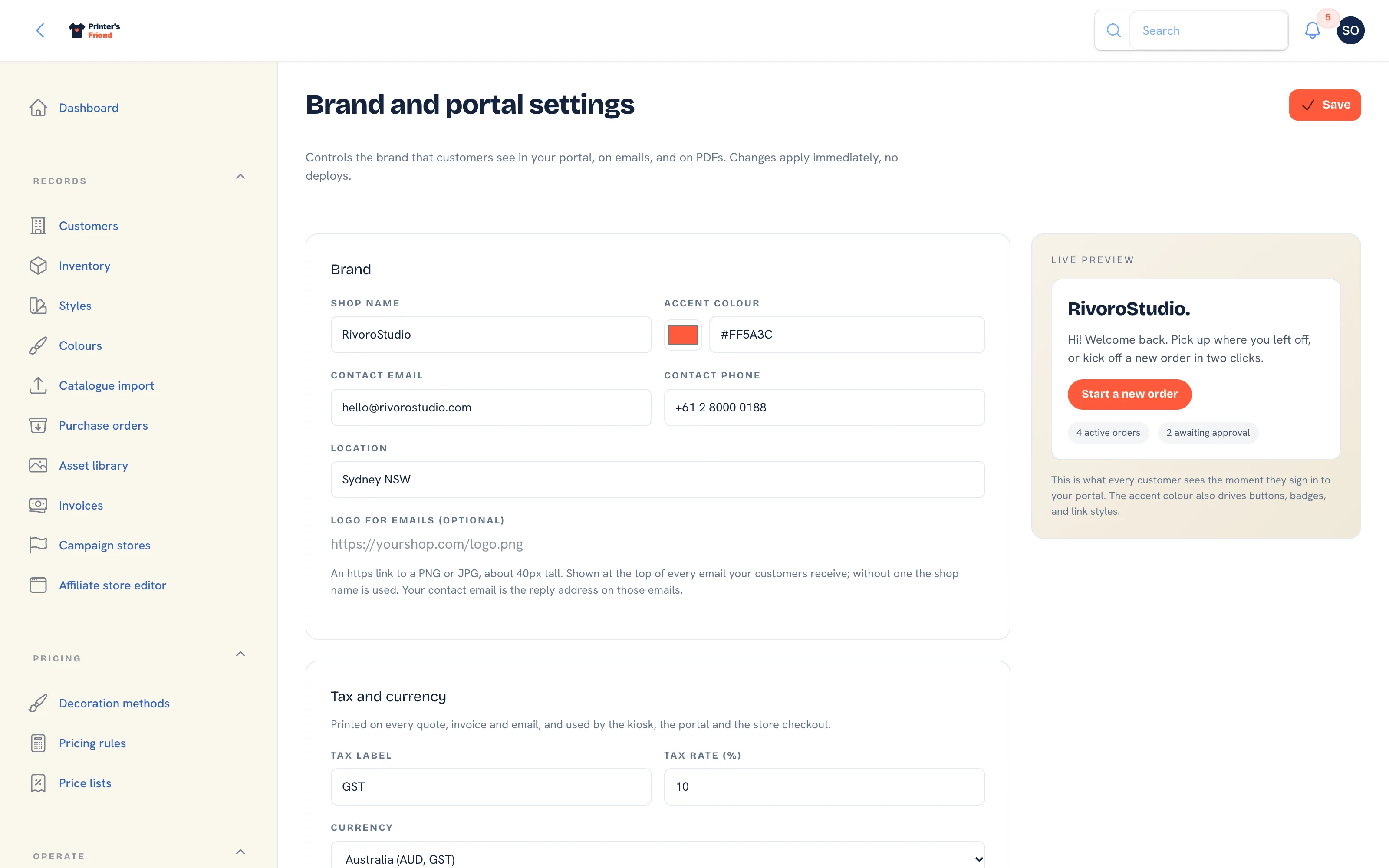 Brand and portal settings, top of the page, with the live portal preview on the right.
Brand
| Field | Where it shows |
|---|---|
| Shop name | The portal header, store and kiosk pages, the From name on customer emails, PDFs |
| Accent colour | Portal buttons, badges and links. The colour picker and the hex field stay in step |
| Contact email | The reply address on every customer email and broadcast, and printed in email footers |
| Contact phone | Email footers and the sender details on carrier labels |
| Location | Email footers, the shop footer and the kiosk footer, for example "Sydney, AU" |
| Logo for emails (optional) | An https link to a PNG or JPG about 40 px tall, shown at the top of every email your customers receive. Without it the shop name is used |
The Live preview on the right redraws the portal greeting, welcome line and button as you type, which is the quickest way to check that an accent colour reads on a white card.
Pick an accent that reads on white
The accent colour is used for button and link text on a cream and white portal. A pale yellow or a light mint saves without complaint and is then hard to read. Use a darker shade here and keep the light one for artwork.
Tax and Currency
| Field | What it does |
|---|---|
| Tax label | GST, VAT, Sales tax, or whatever your documents should say. Required |
| Tax rate (%) | A percentage from 0 to 100. 0 hides the tax line on documents |
| Currency | The currency every price, document and checkout is shown in: USD, AUD, EUR, GBP, NZD or CAD |
The note under the fields previews the result before you save: the tax line label, a sample total in the chosen currency and the invoice title. The title reads Tax invoice only when the label is GST or VAT; any other label gives a plain Invoice. A US workspace sees an extra note: enter the rate for the state you are registered in, or leave it at 0 for no tax line.
These three values drive every quote, invoice, work order and packing slip, the portal, the kiosk and the store and campaign checkouts. See Tax, currency and invoices.
Customer Portal Copy
| Field | What it does |
|---|---|
| Welcome message | The line under the greeting on the portal dashboard. Blank uses the default |
| Primary CTA label | The main button on the portal dashboard, for example "Start a new order" or "Reorder kit" |
Time Zone
Shop time zone sets the zone for due dates, today tables, clock-in times, the late badge on the board and the morning send of customer reminders and chasers. Records are stored in UTC and shown in this zone. A new workspace starts on the zone implied by its billing region, and a value that is not in the list is refused with "Pick a timezone from the list".
Sender Address and Default Carton
The address lines, Suburb, State, Postcode and Country code are printed as the sender on Australia Post labels. The Default carton length, width, height and weight are used when an order does not carry its own. Leave the carton fields blank and the label action refuses with a message instead of booking a parcel with no size. See Shipping: Australia Post.
What Customers See
| Toggle | On | Off |
|---|---|---|
| Show YTD spend | The customer sees their running spend with you this year on the portal dashboard | Hidden |
| Show reorder favourites | Previously ordered SKUs appear as one-click reorder tiles | Hidden |
Both start on. Turn Show YTD spend off for consumer customers, where a running total can feel intrusive.
Walk-in Kiosk
Kiosk on, Device PIN and the Unlock address. The kiosk cannot be switched on until a six digit PIN exists, a new PIN locks every iPad that unlocked under the old one, and the kiosk section reports its result separately from the rest of the page. The full walkthrough is The walk-in kiosk.
Related Pages
- Business Details and Branding: business details, logo, colours and the live preview
- Tax, Currency and Invoices: the tax label, rate and currency on every document
- The Customer Portal: configure the portal, invite contacts and manage their logins
- The Walk-in Kiosk: the iPad kiosk for counter customers and the orders it creates
- Invoice Template: the business details and notes printed on every invoice PDF
- Shipping: Australia Post: book Australia Post labels from the order