

Appearance
Webhook Events
Outbound webhooks POST to your URL when something happens in your shop. You add a subscriber under Insight, then Webhook subscribers, choose the events, and every delivery is signed with that subscriber's secret. This page is the protocol reference: the envelope, the headers, each event's payload, verification and the retry rules. Adding and managing subscribers is covered on Webhook subscribers.
Plan requirement
Outbound webhooks are included on the Premium and Enterprise plans. On a lower plan your subscribers stay saved and deliveries stop, with the reason logged; moving back up resumes them.
Webhooks or the API?
| Use webhooks when | Use the REST API when |
|---|---|
| You want to react to a stage change, an invoice or an approval as it happens | You want to read customers, orders or stock on your own schedule |
| Your system can accept an inbound HTTPS request | Your system can only make outbound requests |
| You are updating a warehouse, accounting or messaging system from shop events | You are creating orders, advancing stages or building a report |
Many setups use both: webhooks to react, the API to create orders and to backfill.
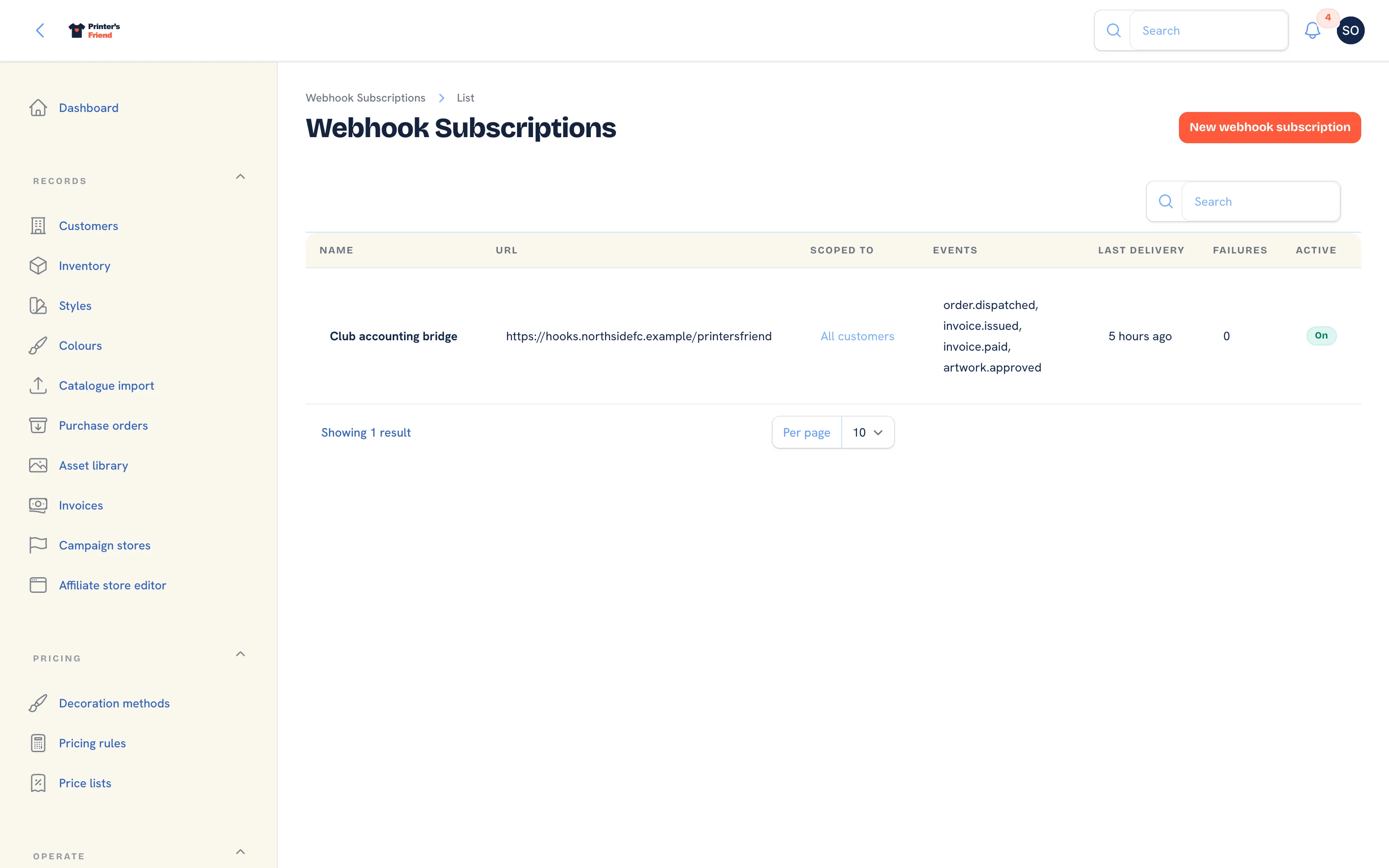 Insight, then Webhook subscribers.
The Envelope
Every delivery has the same shape:
json
{
  "event": "order.stage_changed",
  "data": { },
  "sent_at": "2026-10-09T09:14:22+00:00"
}
With these headers:
| Header | Value |
|---|---|
Content-Type | application/json |
X-PF-Event | The event name |
X-PF-Signature | sha256= followed by the HMAC |
User-Agent | PrintersFriend-Webhooks/1.0 |
Events
| Event | Fires when |
|---|---|
order.stage_changed | An order moves to any stage, including cancellation |
order.dispatched | An order reaches Dispatched |
invoice.issued | An invoice is issued, on dispatch or with Issue invoice on the order, including deposit and balance invoices |
invoice.paid | The payment that completes an invoice is recorded, by card through Stripe, by hand, or pulled from your accounting ledger |
artwork.approved | A customer approves artwork from the portal or the signed approval link |
* | All of the above |
A subscriber can cover every customer or one organisation; an event for another organisation is not delivered to a subscriber scoped to one.
order.stage_changed
json
{
  "event": "order.stage_changed",
  "data": {
    "order_number": "ORD-2026-0012",
    "from_stage": "print_queue",
    "to_stage": "in_production",
    "customer": "Northside Football Club",
    "due_by": "2026-10-20T00:00:00+00:00"
  },
  "sent_at": "2026-10-09T09:14:22+00:00"
}
A cancellation arrives with to_stage of cancelled. Reaching Dispatched sends order.dispatched with the same data, and no order.stage_changed for that move, so subscribe to both to see every move including the last one.
invoice.issued
json
{
  "event": "invoice.issued",
  "data": {
    "invoice_number": "INV-00012",
    "order_number": "ORD-2026-0012",
    "customer": "Northside Football Club",
    "status": "sent",
    "issued_on": "2026-10-09",
    "due_on": "2026-10-16",
    "total_cents": 110000
  },
  "sent_at": "2026-10-09T09:14:22+00:00"
}
invoice.paid
Fires once, when the invoice becomes paid. A partial payment does not fire it; the payment that completes the invoice does. amount_cents is that payment, amount_paid_cents the running total.
json
{
  "event": "invoice.paid",
  "data": {
    "invoice_number": "INV-00012",
    "order_number": "ORD-2026-0012",
    "customer": "Northside Football Club",
    "status": "paid",
    "amount_cents": 60000,
    "amount_paid_cents": 110000,
    "total_cents": 110000,
    "method": "stripe",
    "paid_at": "2026-10-12T02:10:05+00:00"
  },
  "sent_at": "2026-10-12T02:10:05+00:00"
}
method is the payment method recorded on the invoice: stripe for a pay link, the method chosen on a manual payment, or the ledger a payment was pulled from (xero, quickbooks).
artwork.approved
json
{
  "event": "artwork.approved",
  "data": {
    "order_number": "ORD-2026-0012",
    "artwork_title": "Northside winter run",
    "version": 2,
    "customer": "Northside Football Club",
    "via": "portal",
    "approved_at": "2026-10-10T22:41:00+00:00"
  },
  "sent_at": "2026-10-10T22:41:00+00:00"
}
via is portal when the customer approved from the portal and signed-link when they used the one click link in the email.
Verifying a Delivery
The signature is an HMAC-SHA256 of the raw request body, keyed with your subscriber's secret, hex encoded and prefixed with sha256=.
php
$expected = 'sha256=' . hash_hmac('sha256', $rawBody, $secret);
if (! hash_equals($expected, $request->header('X-PF-Signature'))) {
    abort(401);
}
javascript
const crypto = require('crypto')
const expected = 'sha256=' + crypto.createHmac('sha256', secret).update(rawBody).digest('hex')
const ok = crypto.timingSafeEqual(Buffer.from(expected), Buffer.from(signature))
python
import hashlib, hmac

expected = "sha256=" + hmac.new(secret.encode(), raw_body, hashlib.sha256).hexdigest()
if not hmac.compare_digest(expected, signature):
    abort(401)
Hash the raw body, never a re-serialised object, because re-encoding JSON changes the bytes. Compare in constant time. Reject on mismatch.
The signature covers the body only and carries no timestamp, so a delivery that is captured and sent to you again verifies exactly as the original did. Treat a valid signature as proof that the payload came from your shop, and rely on idempotency, keyed on the event, the document number and sent_at, to make a replayed or retried delivery harmless.
Retries and Failure Handling
| Behaviour | Detail |
|---|---|
| Timeout | 10 seconds |
| Attempts | 5 |
| Backoff | 1 minute, 5 minutes, 15 minutes, 1 hour, 4 hours |
| Success | Any 2xx response |
| Repeated failure | After 20 consecutive failed deliveries the subscriber is deactivated |
Every attempt is stored with the status code and the first 1,000 characters of your response. A transport error (no connection, TLS failure) is stored as transport: followed by the error. There is no screen in the workspace that lists those deliveries: the signals you can see are Last delivery and Failures on the subscribers list, and a subscriber switched off after 20 consecutive failures shows Active off. Fix the endpoint, then tick Is active on the subscriber to resume.
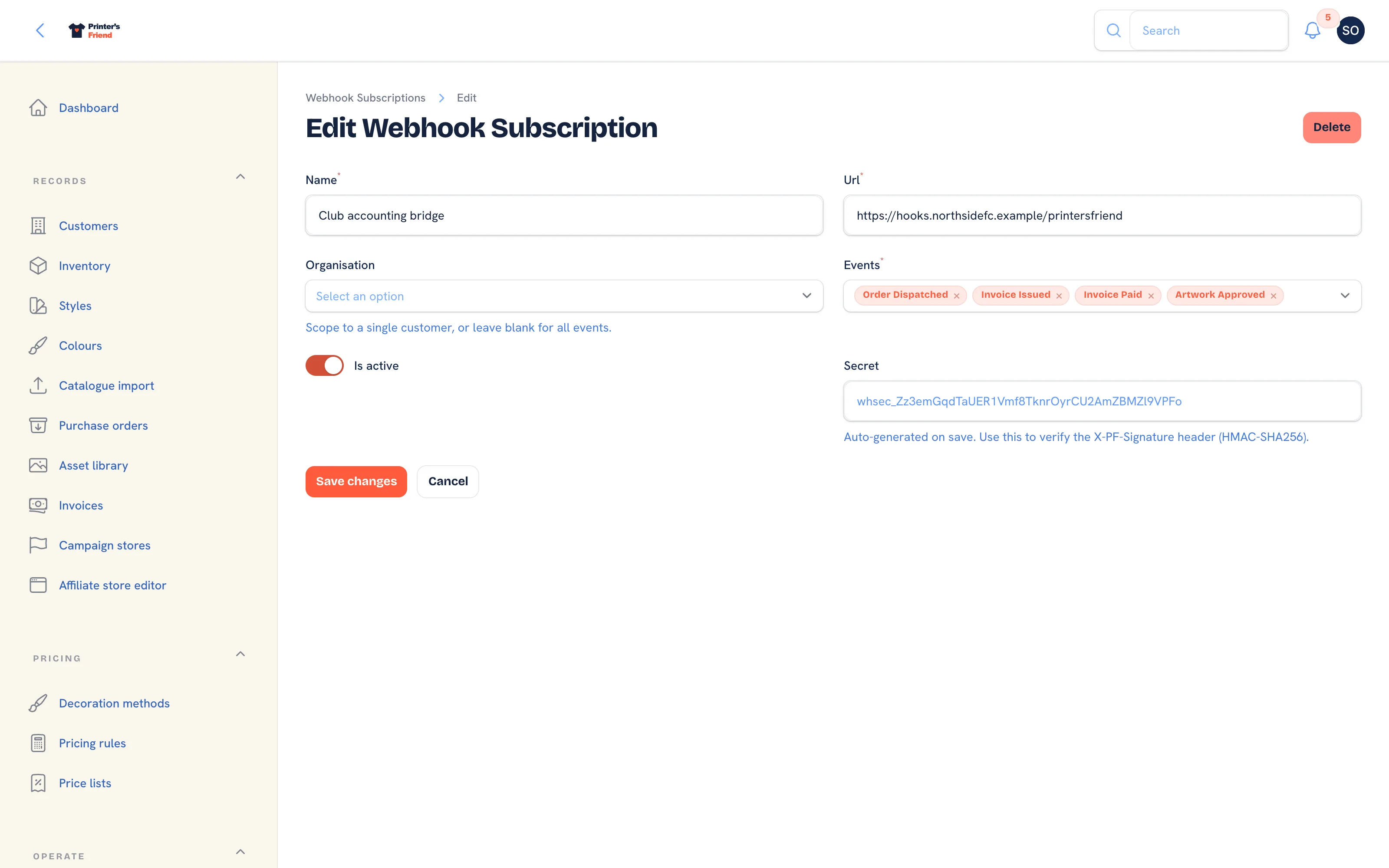 A saved subscriber with its secret.
Writing a Good Endpoint
- Be idempotent. The same event can arrive more than once, from a retry after a slow success or from a replay. Key on the event, the document number and
sent_at, and ignore duplicates. - Return 2xx fast, then do the work. Processing inside the request runs into the 10 second timeout and is retried.
- Return a useful body on error. It is stored with the attempt, and it is what support reads when you ask why a delivery failed.
- Verify the signature before trusting the payload.
Test with a real delivery
Add the subscriber, then move a test order one stage. Within a few seconds Last delivery on the subscribers list shows the time of the attempt. Failures stays at 0 when your endpoint answered 2xx; a non-2xx answer or a timeout moves it to 1 and the retry schedule starts.
Related Pages
- Webhook subscribers: add a subscriber, pick its events and read its secret
- REST API: read customers, orders and stock, and create orders, on your own schedule
- API tokens: the token the API needs and its one year expiry
- Orders: what each stage change does inside the shop
- Plans and limits: which plans include webhooks