

Appearance
Stripe
The Stripe (customer payments) card on Insight, then Integrations connects the Stripe account your customers pay into. It is your own Stripe account, separate from the one that bills your Printer's Friend subscription. With it connected, every invoice carries a hosted pay link, deposit checkouts work, store and campaign buyers can pay by card, and payments, refunds and disputes are recorded on the invoice without anyone typing them in.
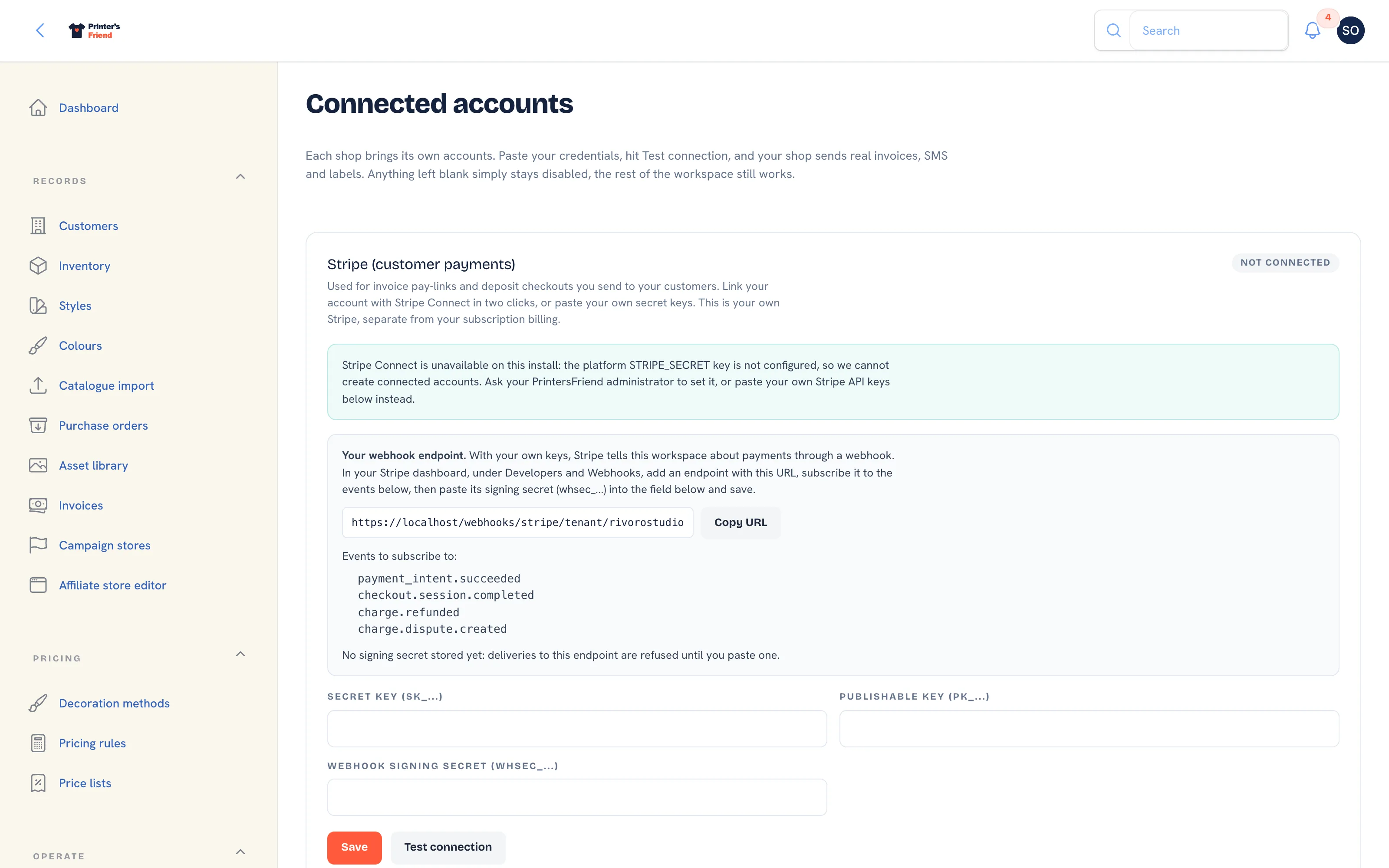 The Stripe card. The block under the heading changes with the state of your connection.
The setup walkthrough is Payments with Stripe. This page is the reference for the card itself.
Two Ways to Connect
| Method | How it works | When to use it |
|---|---|---|
| Stripe Connect | Connect with Stripe sends you to Stripe's own onboarding and back. Printer's Friend stores the account id and whether charges are enabled. Payments land in your Stripe account. | The default once the platform's Connect webhook is registered |
| Your own API keys | Paste a secret key, a publishable key and a webhook signing secret from your Stripe dashboard, and register the endpoint shown on the card in Stripe. | Today, and whenever you want full control of the account |
Pasted keys take precedence. If both exist, the card says "You are using your own Stripe API keys below, and they take precedence" and asks you to disconnect them first if you would rather use Connect.
Connecting with Your Own Keys
- In your Stripe dashboard open Developers, then API keys. Copy the Secret key (
sk_live_...) and the Publishable key (pk_live_...). - On the Stripe card, paste them into Secret key (sk_...) and Publishable key (pk_...), then click Save.
- Read the block titled Your webhook endpoint. It shows a URL of the form
https://printersfriend.com/webhooks/stripe/tenant/your-workspace(the last part is your workspace address) with a Copy URL button, and lists the events to subscribe to:payment_intent.succeededcheckout.session.completedcharge.refundedcharge.dispute.created
- In Stripe open Developers, then Webhooks, add an endpoint with that URL and tick those four events. Stripe shows the endpoint's signing secret (
whsec_...). - Paste it into Webhook signing secret (whsec_...) on the card and click Save. The block now reads "Signing secret stored: deliveries to this endpoint are verified and recorded on your invoices." Until then it reads "No signing secret stored yet: deliveries to this endpoint are refused until you paste one."
- Click Test connection. The pill changes to Connected.
The webhook is what marks invoices paid
Payment confirmation comes from Stripe's webhook, never from the customer's browser. With the keys saved and no endpoint registered, customers can pay and every invoice keeps showing unpaid. Register the endpoint and paste the signing secret before you send the first pay link.
Every delivery to your endpoint is checked against your stored signing secret and recorded once by event id, so a replayed event never records a payment twice. A delivery with a bad signature is refused, and the endpoint answers with an error while no secret is stored.
Connecting with Stripe Connect
Connect is offered only once the platform's Connect webhook is registered. Until then the card reads "Stripe Connect is awaiting platform setup" and asks you to paste your own keys in the meantime; nothing else on the card changes.
When Connect is available:
- Click Connect with Stripe. Stripe's onboarding opens and asks for your business details and bank account.
- Finish onboarding. Stripe returns you to the Integrations page with the notification "Stripe account connected".
- The card now reads "Connected via Stripe Connect. Account acct_..." followed by either "Charges are enabled: invoice pay links collect payments straight into your Stripe account" or "Charges are not enabled yet. Finish the remaining requirements in your Stripe dashboard."
Pay links are created only once charges are enabled on the connected account, so a half-finished onboarding never produces a link nobody can pay. Payments on a connected account are recorded through the platform's own Connect endpoint; you register nothing in Stripe.
Disconnect Stripe Connect removes the stored link after a confirmation. Your Stripe account is not deleted.
What Stripe Enables
| Feature | With Stripe | Without Stripe |
|---|---|---|
| Hosted pay link on every invoice, created before the invoice email goes out | Yes | The email leaves out the "Pay online" line |
| Payment recorded on the invoice when the customer pays | Yes | Record it by hand on the invoice |
| Deposit invoices with a pay link | Yes | Deposit invoices still issue; payment by hand |
| Card capture after a store, campaign or portal cart checkout | Yes | Not available |
| Refunds from a return sent back to the customer's card | Yes | The refund is recorded as a manual reversal |
| A dispute flagged on the invoice with the reason and the Stripe deadline | Yes | Not available |
| Invoices, PDFs and reminders | Yes | Yes |
A bank transfer shop can run without Stripe. Put your bank details in the invoice template's payment instructions and record payments on the invoice.
Testing
Use test keys (sk_test_..., pk_test_...) and a test webhook endpoint first. Issue an invoice to yourself, pay the link with a Stripe test card, and watch the invoice flip to paid on its own. Then replace the keys with live ones, register the live endpoint, and make one real low value payment to yourself before invoicing a customer.
Troubleshooting
| Symptom | Cause |
|---|---|
| A customer paid but the invoice shows unpaid | The webhook is not arriving or not verifying. Check the endpoint URL in Stripe matches the card, the four events are ticked, and the signing secret on the card is the one Stripe shows for that endpoint |
| No pay link on an invoice | Stripe is not connected, or on Connect the account's charges are not enabled yet |
| The card says "awaiting platform setup" | Connect is not available yet on the platform. Paste your own keys instead |
| Everything worked in test and fails live | Test keys are still saved, or the live endpoint was never added in Stripe |
| A card is declined for one customer | Stripe's own decline reason, visible in your Stripe dashboard |
| An invoice shows a dispute | A customer disputed the charge. Respond in your Stripe dashboard before the deadline; the payment is held until Stripe closes the dispute |
Related Pages
- Payments with Stripe: connect Stripe at setup
- Payments and Deposits: deposits before dispatch, pay links, manual payments and refunds
- Invoices: invoices, reminders, payments, refunds and credit notes
- Troubleshooting: symptoms with the usual cause first