

Appearance
Quotes
A quote is a set of priced lines that has not yet been committed. Once your pricing rules are in, a quote is a customer, some lines and a required-by date, and the pricing engine does the arithmetic.
Where It Lives
| Page | What it's for |
|---|---|
| Operate, then Quotes | Every quote with its status, total and required-by date |
| New quote | Pick the customer and contact; lines are added on the quote itself |
| The quote page | Add and remove lines, read the pricing trail, send, accept, decline or expire |
| Edit | Change the contact, status, required-by date and notes |
| The customer's accept link | The page a customer opens from the quote email to accept or request changes |
Plan requirement
Accepting a quote creates an open order, which counts against your plan's open order limit: 10 on Free, 100 on Starter, 1,000 on Premium and unlimited on Enterprise. An order leaves the count when it is dispatched or cancelled. See Plans and limits.
The Quotes List
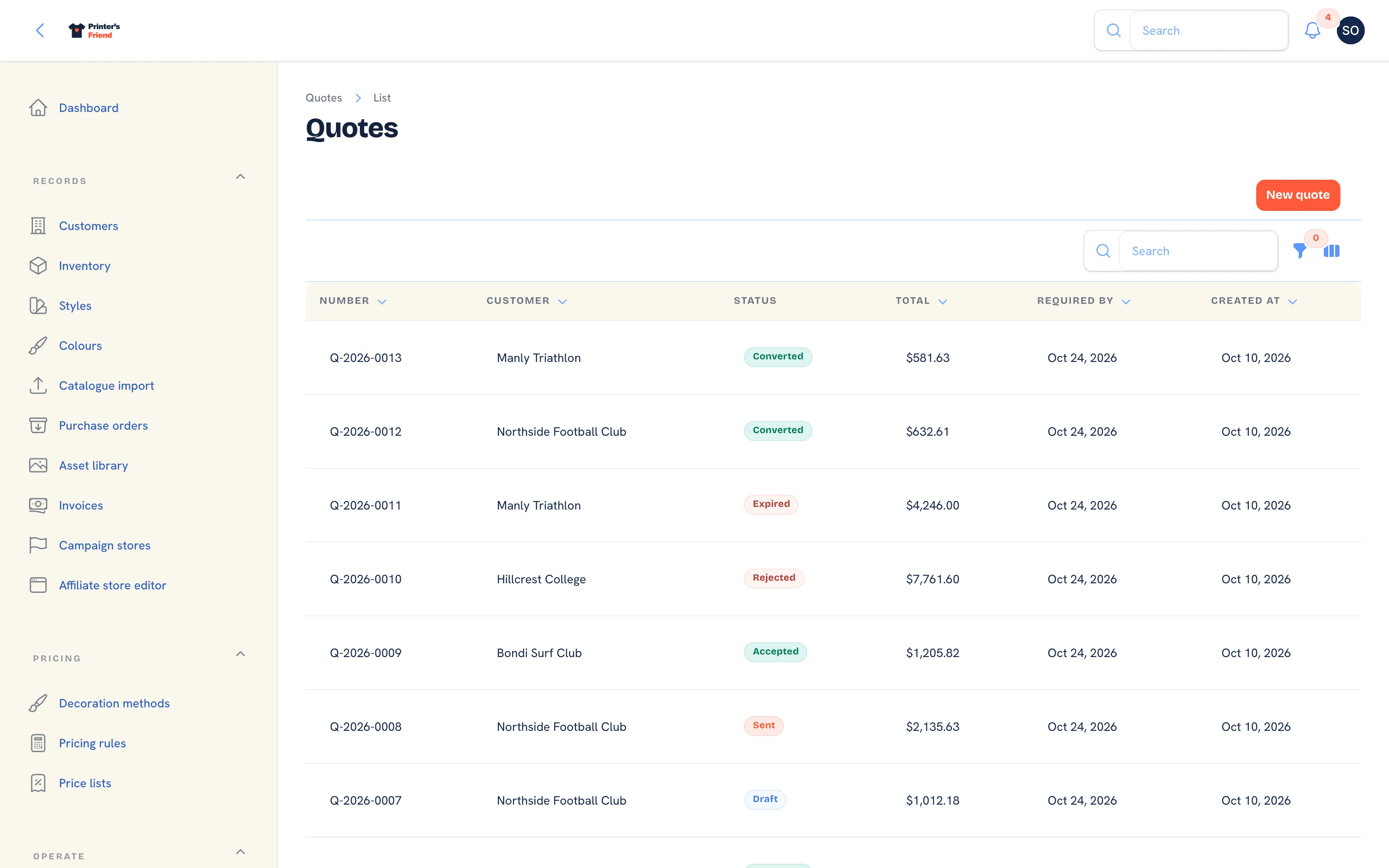 Every quote, newest first, with a status filter.
The list shows Number, Customer, Status, Total, Required by and Created. Filter by Status, or use the global search at the top of the workspace to find a quote by number or customer name. Quote numbers run Q-2026-0001 and upwards within the year.
Creating a Quote
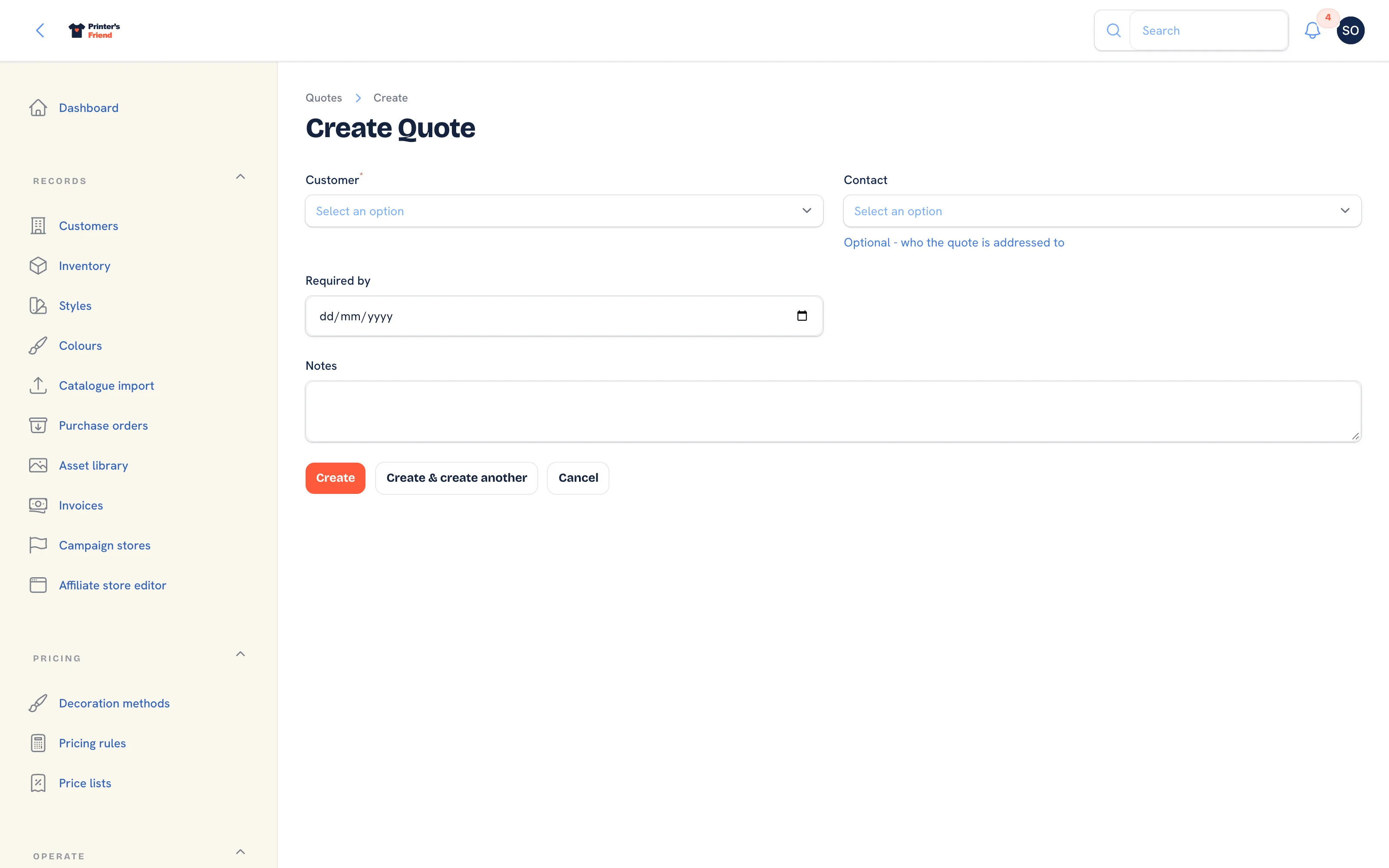 A quote starts with the customer. Lines come next, on the quote page.
- Go to Operate, then Quotes and click New quote. Starting from a customer record with + New quote opens the same form with the customer already chosen.
- Pick the Customer. Their price list and payment terms come with them.
- Pick a Contact if the quote should go to a particular person. The quote email, the chase emails and the later proof and invoice emails go to this person. Leave it blank and they go to the customer's primary contact.
- Set Required by and add any Notes, then click Create. The quote opens with the message "Quote created - add lines to price it".
Check the load before you promise a date
The production load heatmap on the dashboard shows units due per day for the next fourteen days. If Thursday already carries 240 units, do not promise another 200 for Thursday.
Adding Lines
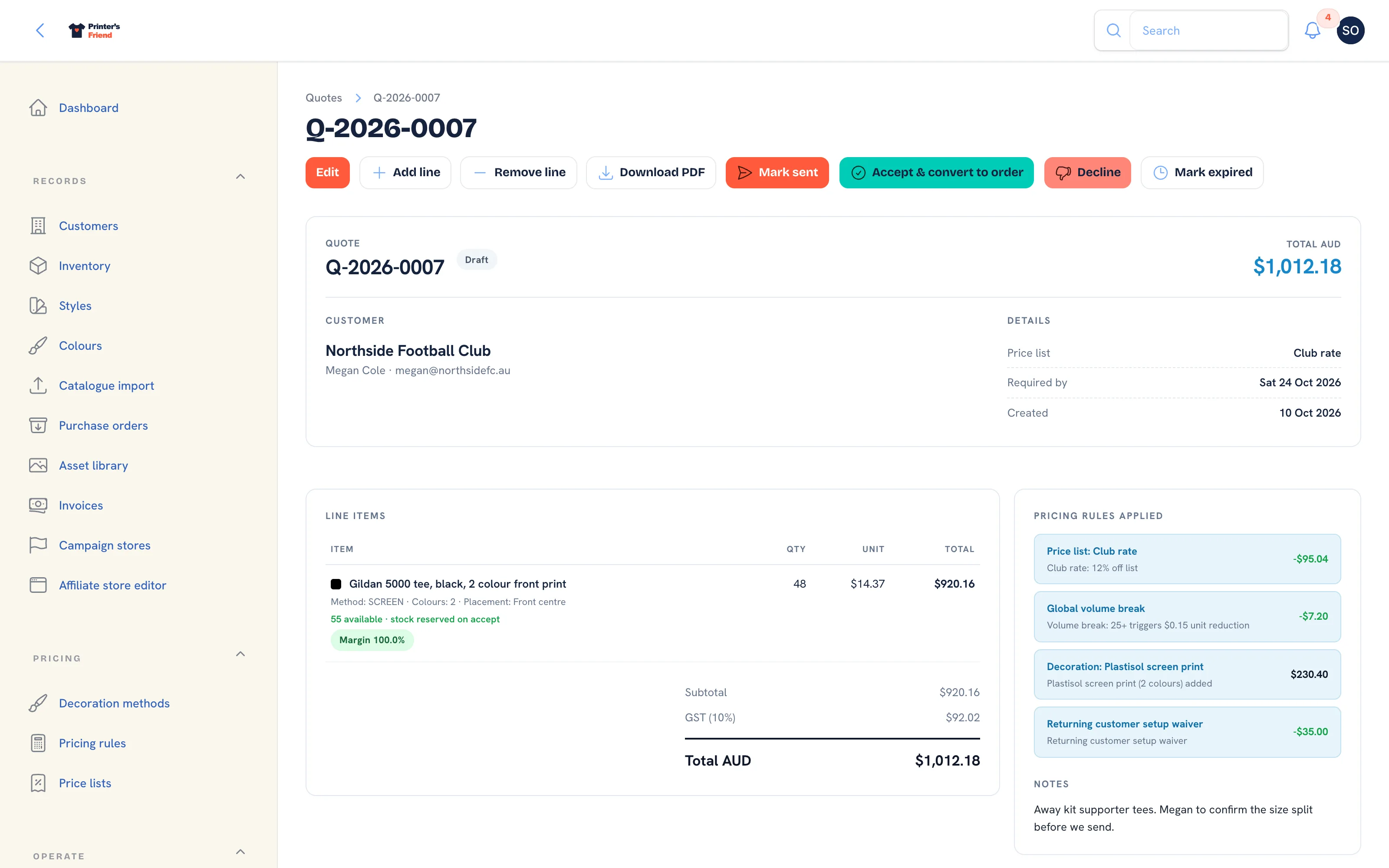 A draft quote. Add line and Remove line sit in the header while the quote is a draft or sent.
- On the quote page, click Add line.
- Pick the Garment SKU, or leave it blank for a custom line that is not stock.
- Type a Description if you want something other than the SKU's own.
- Enter the Quantity, pick the Decoration method and set Print colours. The colour count selects the row in the method's rate matrix.
- For a custom line only, enter the Unit price (custom lines only). A SKU line ignores it and is priced from the style's list price plus your pricing rules.
- Click Submit. The notification reads "Line added, totals repriced" and the totals, the tax line and the pricing rules panel update.
A front print and a back print are two lines, because that is how the cost behaves: two setups, two rates.
Remove line asks which line to take off and reprices the rest. Two people can work on the same quote at once: each edit re-reads the lines before repricing, and if the quote changed underneath you the notification reads "This quote changed while you were editing it. Reload the quote and try again."
Reading the Quote Page
The header shows the number, the status pill and the total in your shop's currency. Below it:
| Panel | What it shows |
|---|---|
| Customer | The organisation and the contact the quote is addressed to |
| Details | Price list, required-by date, created date and sent date |
| Line items | Each line with its decoration spec, a colour swatch, the stock available ("145 available, stock reserved on accept") and a margin pill where costs are known |
| Totals | Subtotal, setup fees, discount, the tax line with your tax label and rate, and the total in your currency |
| Pricing rules applied | Every rule that fired and what it did to the total, for example a club discount or a volume break |
| Notes | The notes typed on the quote |
The pricing rules panel is a frozen record. It stays on the quote even if you later change the rule, so when a customer questions a price, read it first. A quote with no rules reads "No rules fired - quote at list price."
Sending the Quote
- Click Mark sent. The quote needs a contact with an email address and a working sender identity for your shop; if the customer has no email the notification offers Add a contact, which opens the customer's contacts.
- The status becomes Sent, the sent date is recorded and the quote is given a 30 day expiry if it had none.
- The email leaves with the quote PDF attached and two signed links: Accept this quote and Request changes. Both work for 30 days with no portal login. If the PDF could not be rendered the email says the PDF will follow separately and the activity timeline records why.
- The notification reads "Quote emailed to" followed by the address.
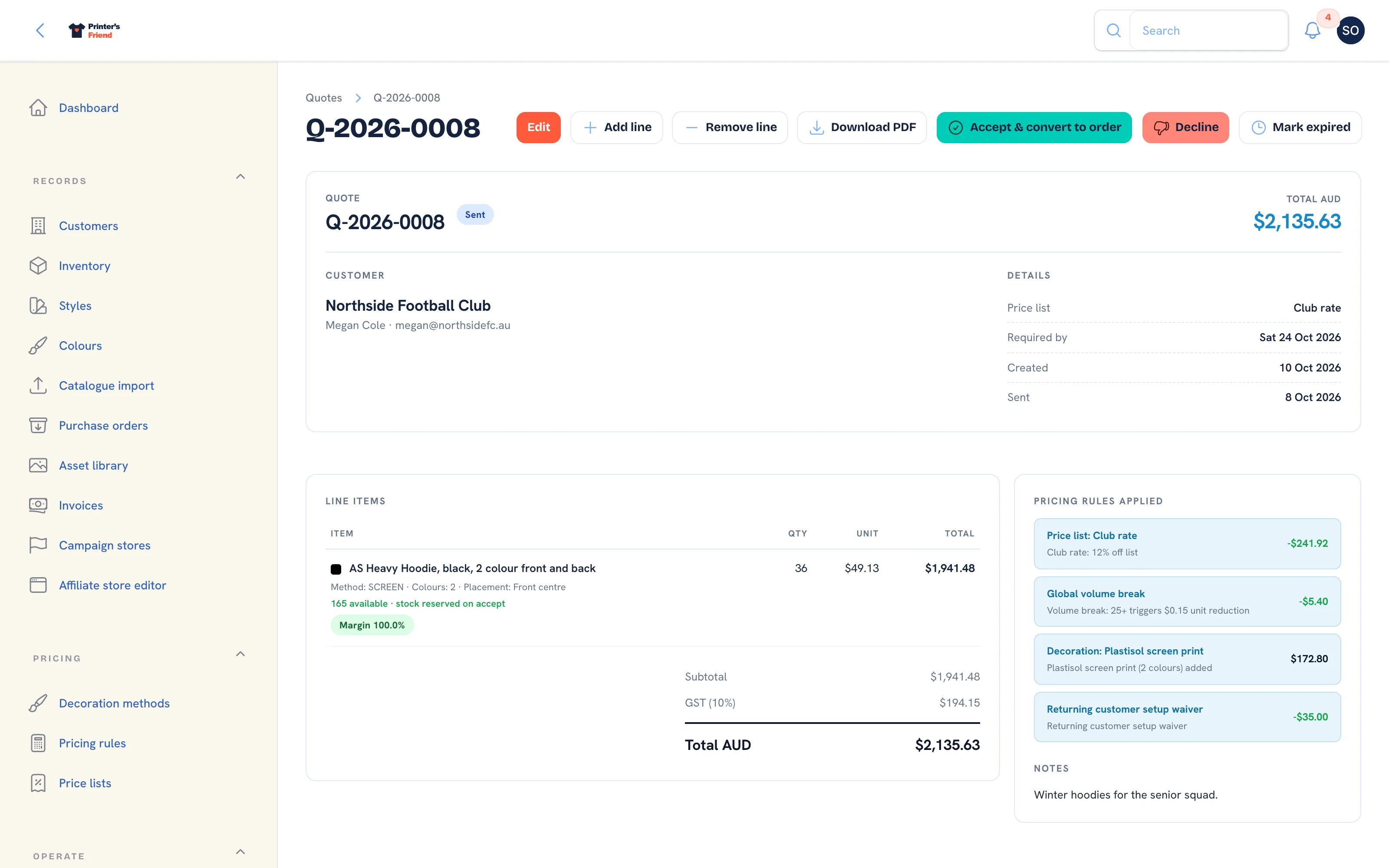 A sent quote. Accept, Decline and Mark expired stay available until the customer answers.
A failed send does not pretend
If the email cannot be delivered the quote goes back to its previous status, the quote page shows a warning naming the address and the error, and the timeline records "Quote could not be sent". Fix the problem, then click Mark sent again.
What the Customer Sees
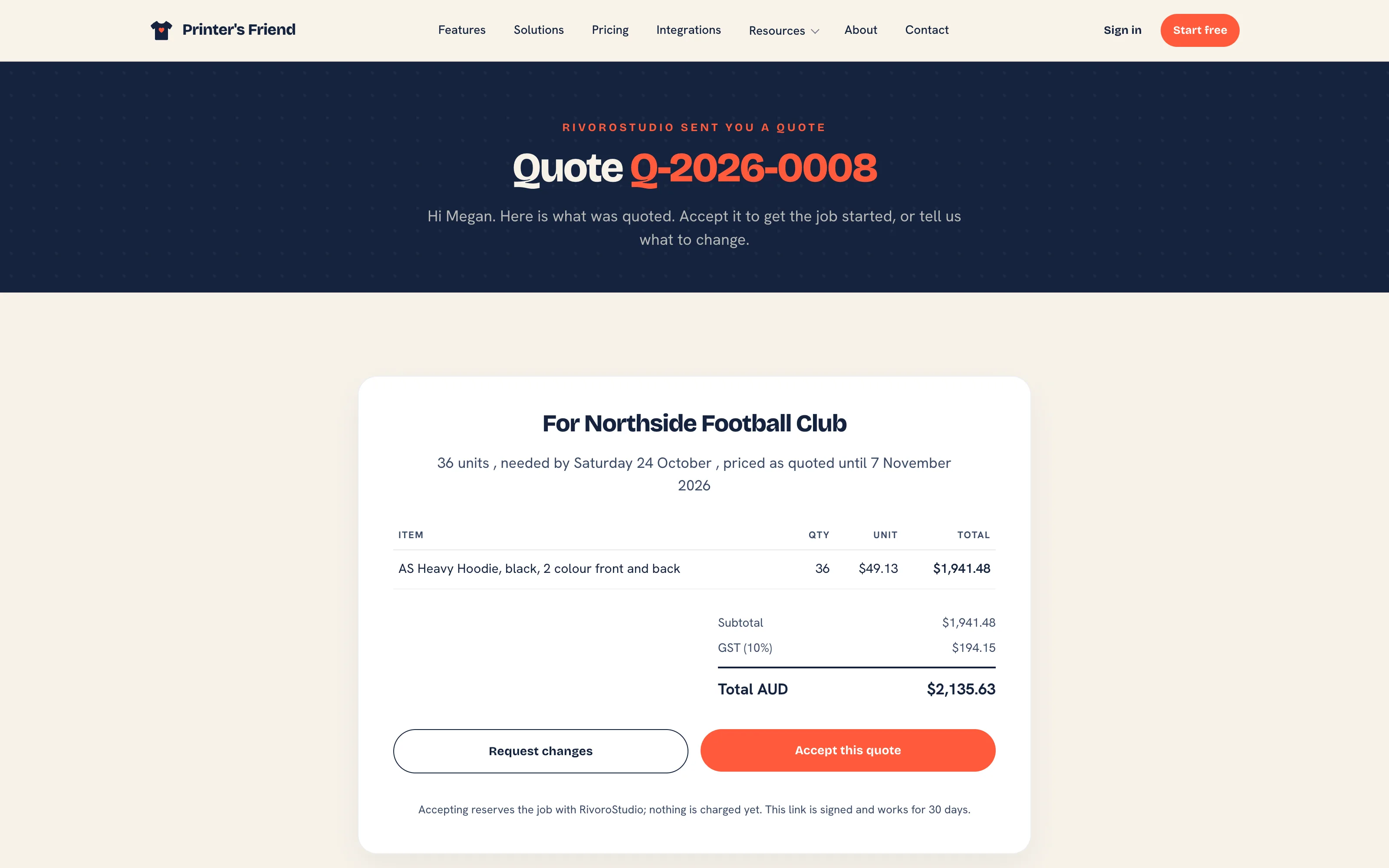 The page behind the signed link in the quote email. No account is needed.
The link opens a page with the quote lines, the totals, the required-by date and the date the price holds until. The customer has two buttons:
- Accept this quote creates the order through the same path staff use: stock is reserved, the order lands in the Artwork stage and the page reads "Accepted." with the new order number. Staff with access to quotes are notified in the workspace. A second click on the same link reads "Already accepted." and creates nothing.
- Request changes opens a note box. The note lands on the quote's activity timeline, staff are notified with the text, and the quote stays Sent so you can edit it and send it again.
 Requesting changes. The note reaches the shop and the quote stays open.
A quote that has expired or been declined shows "This quote is no longer open" and offers no buttons. If your plan's open order limit is full when a customer accepts, the page reads "Nearly there.", the quote stays open and staff are told to create the order by hand.
Accepting in the Workspace
- Click Accept & convert to order and confirm.
- Stock is reserved for every SKU line, the order is created in the Artwork stage with the quote's lines, cost snapshots and required-by date, and the customer's default billing and shipping addresses are copied onto it.
- The quote becomes Converted and you are taken to the new order.
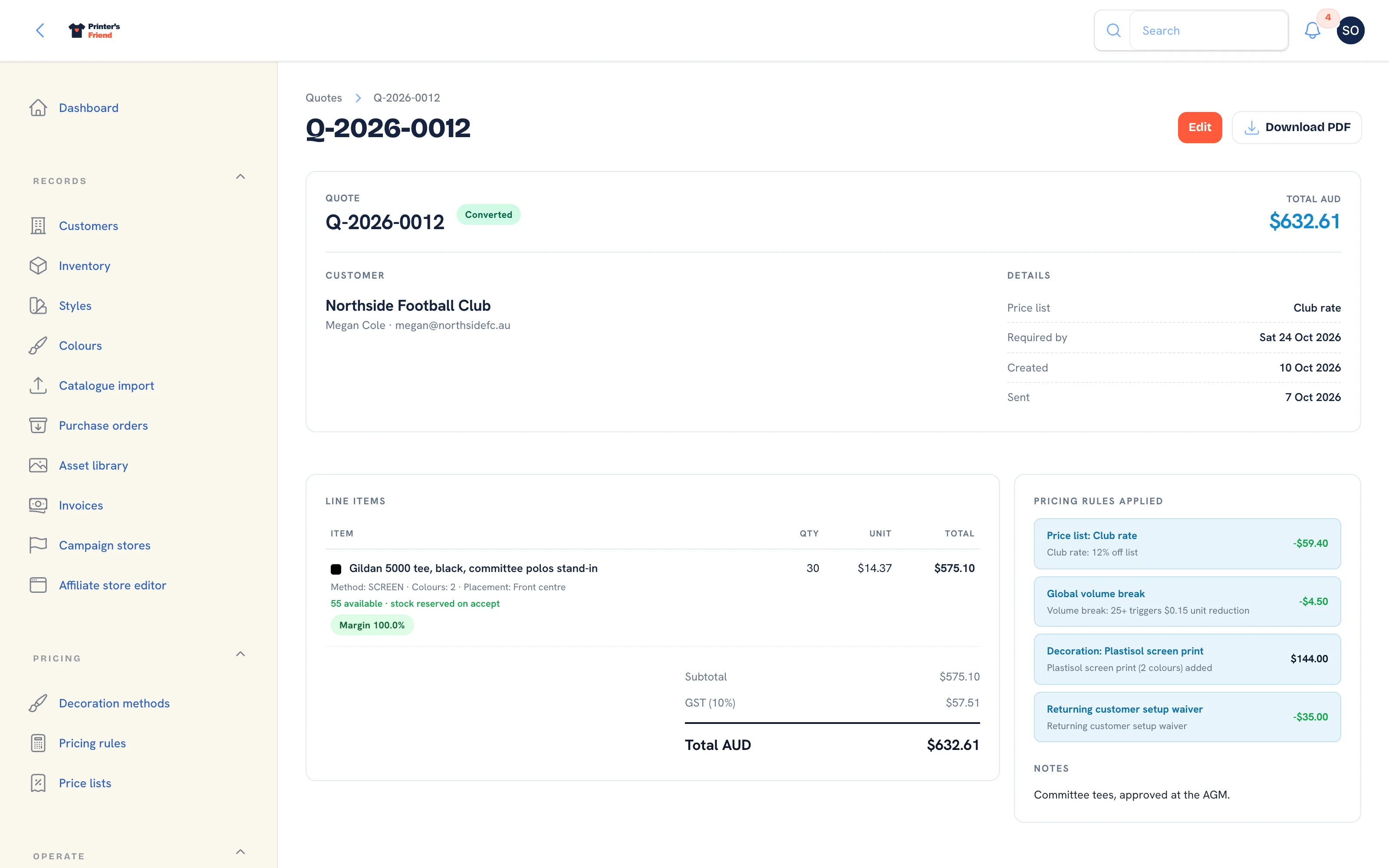 A converted quote stays on file and can no longer be edited.
Lines ordered through the online designer keep their design through every staff edit. When the quote converts, each design's mockup is filed as artwork version one on the order with the note "Auto-created from customer design", so nobody re-uploads what the customer built.
Declining or Expiring a Quote
Both actions are available while a quote is Draft or Sent.
- Decline asks "Why did the customer decline?". The reason goes on the activity timeline and the status becomes Rejected.
- Mark expired sets the status to Expired and records the expiry date.
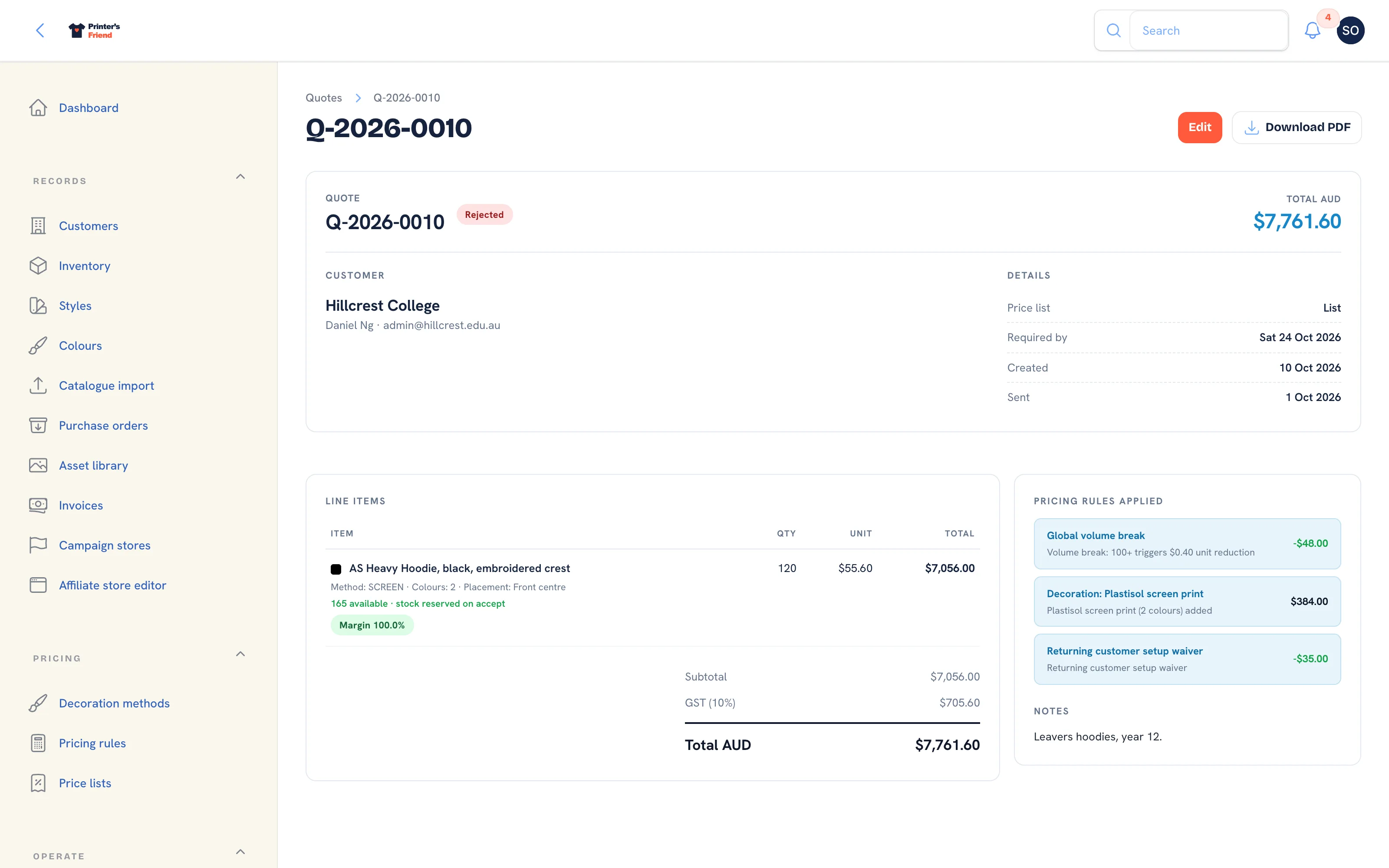 A declined quote. It stays on file but cannot be accepted.
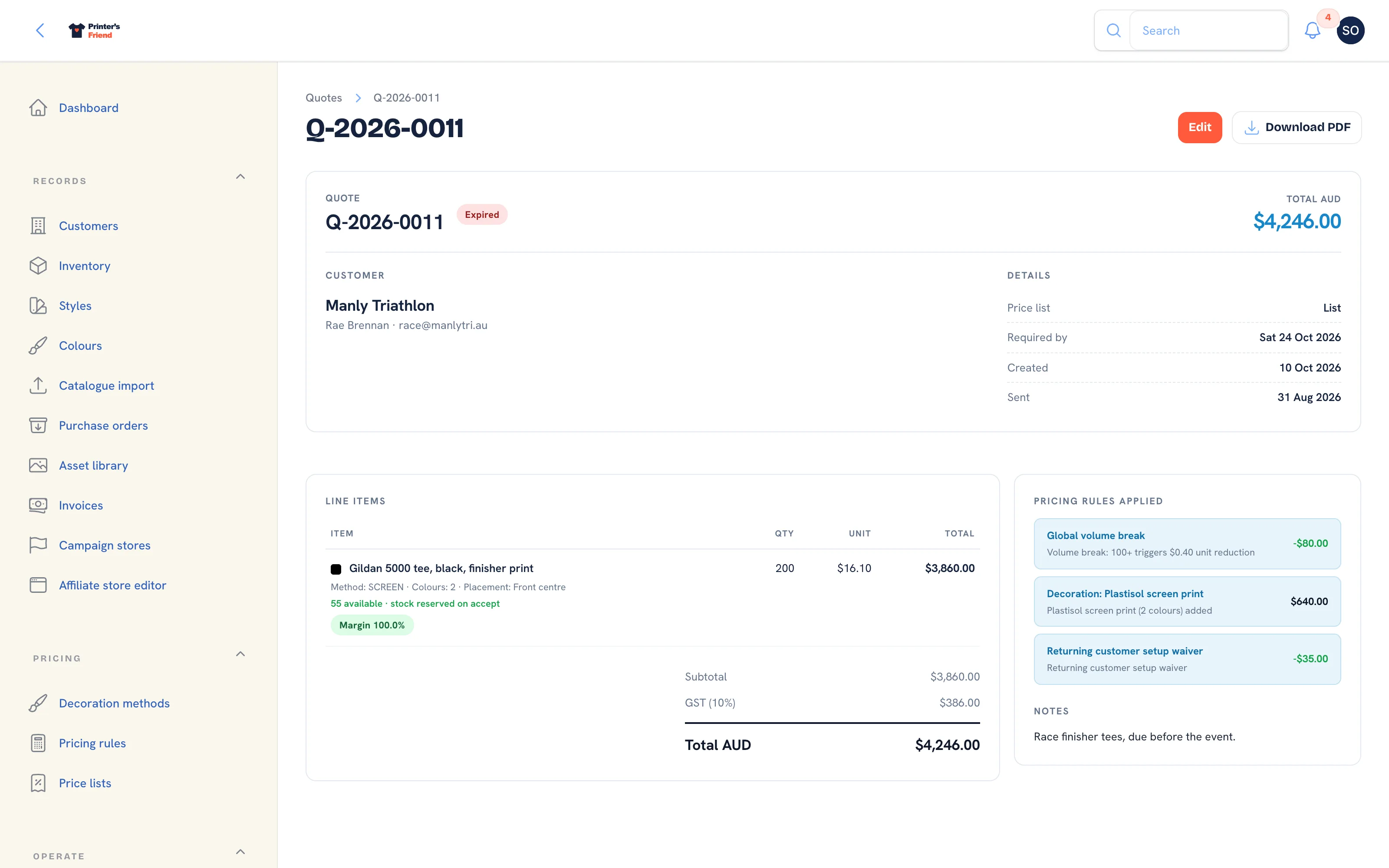 An expired quote. The customer can ask for a fresh one.
Neither can be accepted afterwards, from the workspace or from the customer's link. Send a new quote instead.
Quote Statuses
| Status | Meaning |
|---|---|
| Draft | Being built. Lines can be added and removed |
| Sent | With the customer. Lines can still be edited, and the chase emails apply |
| Converted | Accepted. An order exists and the quote is read-only |
| Rejected | Declined by you on the customer's behalf |
| Expired | Past its validity, by date or by Mark expired |
| Accepted | A closed status you can set by hand on the edit form. It does not create an order; use Accept & convert to order for that |
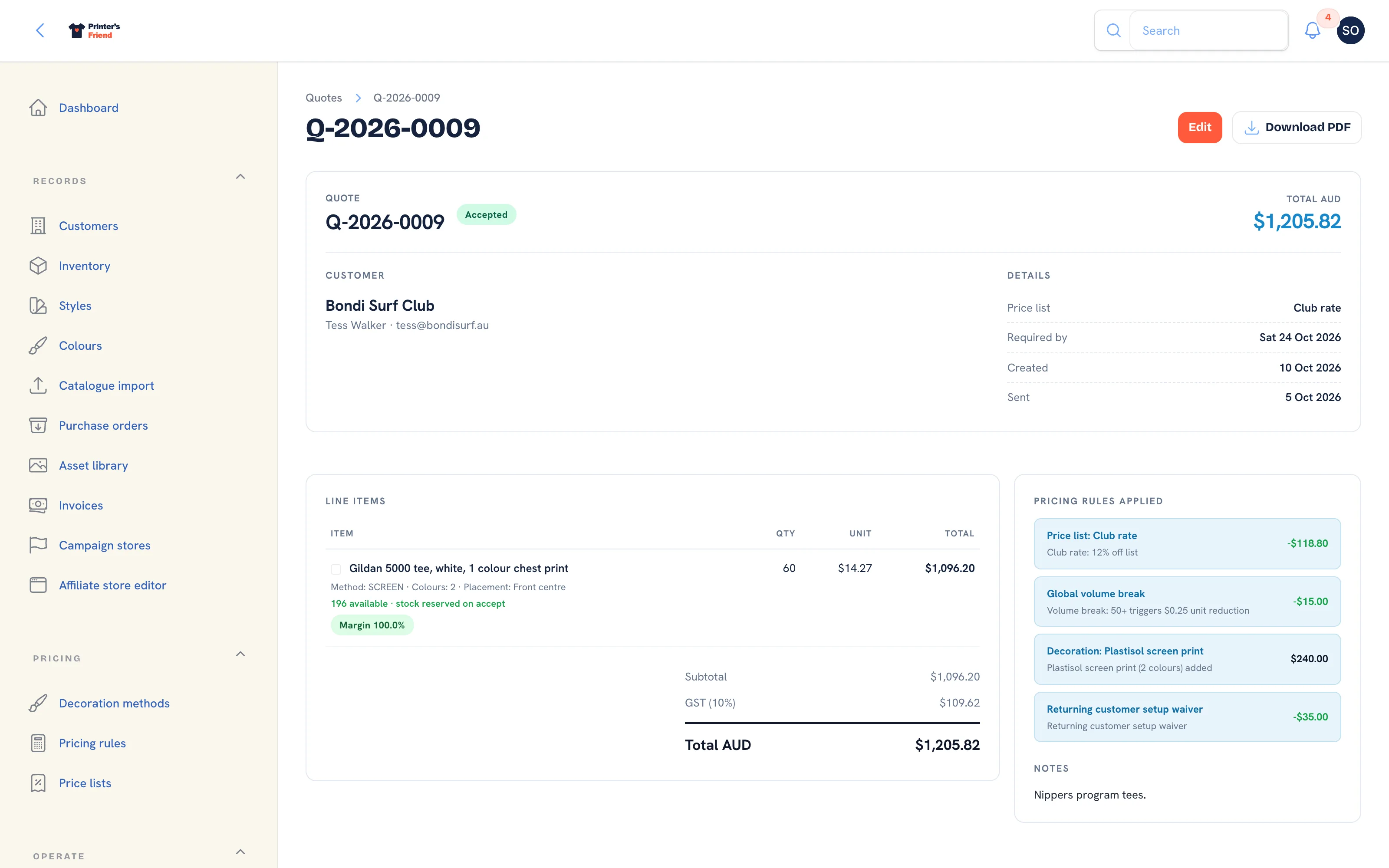 A quote in the Accepted status. Only Edit and Download PDF remain in the header, and no order was created.
Editing a Quote
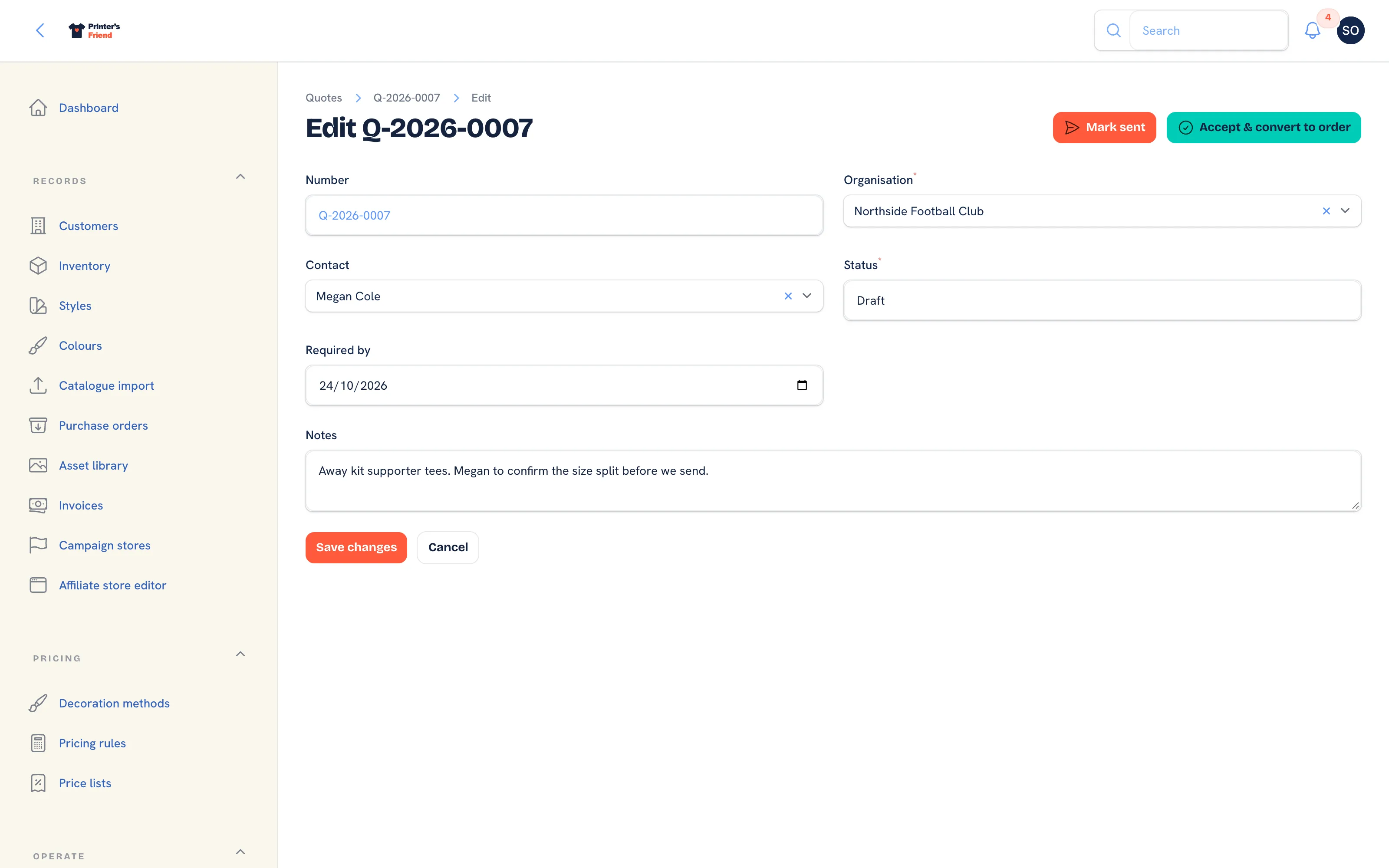 The edit form. Lines are edited on the quote page, not here.
Edit changes the Organisation, Contact, Status, Required by and Notes. Mark sent and Accept & convert to order are also available here. Saving the form does not reprice lines; add and remove lines on the quote page to reprice.
Chasing a Quote
Quotes that go quiet are chased for you. At 9:30 on your shop's clock:
- A quote that has sat in Sent for seven days with no answer gets one follow-up email.
- A quote entering the last five days before its expiry gets a nudge, unless a chase already went out inside that window.
- A quote past its expiry is never chased.
Each chase goes to the quote's contact and carries the same signed accept and change links as the quote email, so the customer can act from the chase itself.
Where Quotes Come From
Besides the ones you type, quotes arrive from the customer portal cart, a portal reorder, a team store or a campaign page. Each lands as a Draft priced by the same engine, with the customer's coupon and price list discount recorded, and staff are notified. A portal reorder carries the note "Reorder of" followed by the original order number. Review the draft, then send or accept it like any other.
Who Can Do What
Owners, managers and the sales role create, send and convert quotes. Viewers can open every quote and cannot change it. Roles are set in Team and permissions.
Related Pages
- Pricing Rules: customer discounts, quantity breaks and setup waivers
- Price Lists: the named rates customers sit on
- Orders: the order page, stage moves and what each one triggers
- Customers: the customer record, contacts, portal logins and addresses
- The Customer Portal: configure the portal, invite contacts and manage their logins
- Coupon Codes: codes a customer types in the portal cart