

Appearance
Ways to Sell
Printer's Friend sells in five places besides the quotes you write yourself: a public shop, a branded store per customer, a group buy campaign page, the customer portal and a walk-in kiosk. All of them price through your own price lists and pricing rules, and all of them land as a draft quote or an order in your workspace, so nothing prints until a member of staff has looked at it.
Where It Lives
| Page | What it's for |
|---|---|
yourshop.printersfriend.com/shop | Your active catalogue, open to anyone, with a product page per style. Ordering goes through a quote or the portal. See Public shop |
| Records, then Affiliate store editor | A branded store for one club, school or company at /store/{slug}, with guest checkout. See Affiliate team stores |
| Records, then Campaign stores | A group buy page at /campaign/{slug} with a target, a close date and a progress bar. See Campaign stores |
| Insight, then Brand & portal, section Walk-in kiosk | The iPad kiosk at /workspace/kiosk for counter customers. See The walk-in kiosk |
| Insight, then Coupon codes | Codes a customer types in the portal cart. See Coupon codes |
| Insight, then Promotions | Automatic offers applied to portal cart orders. See Promotions |
| Insight, then Email broadcasts | A marketing email or SMS to customers who have agreed to hear from you. See Email broadcasts |
The portal itself, where signed-in customers reorder at their price list rate, approve artwork and pay invoices, is covered under The customer portal.
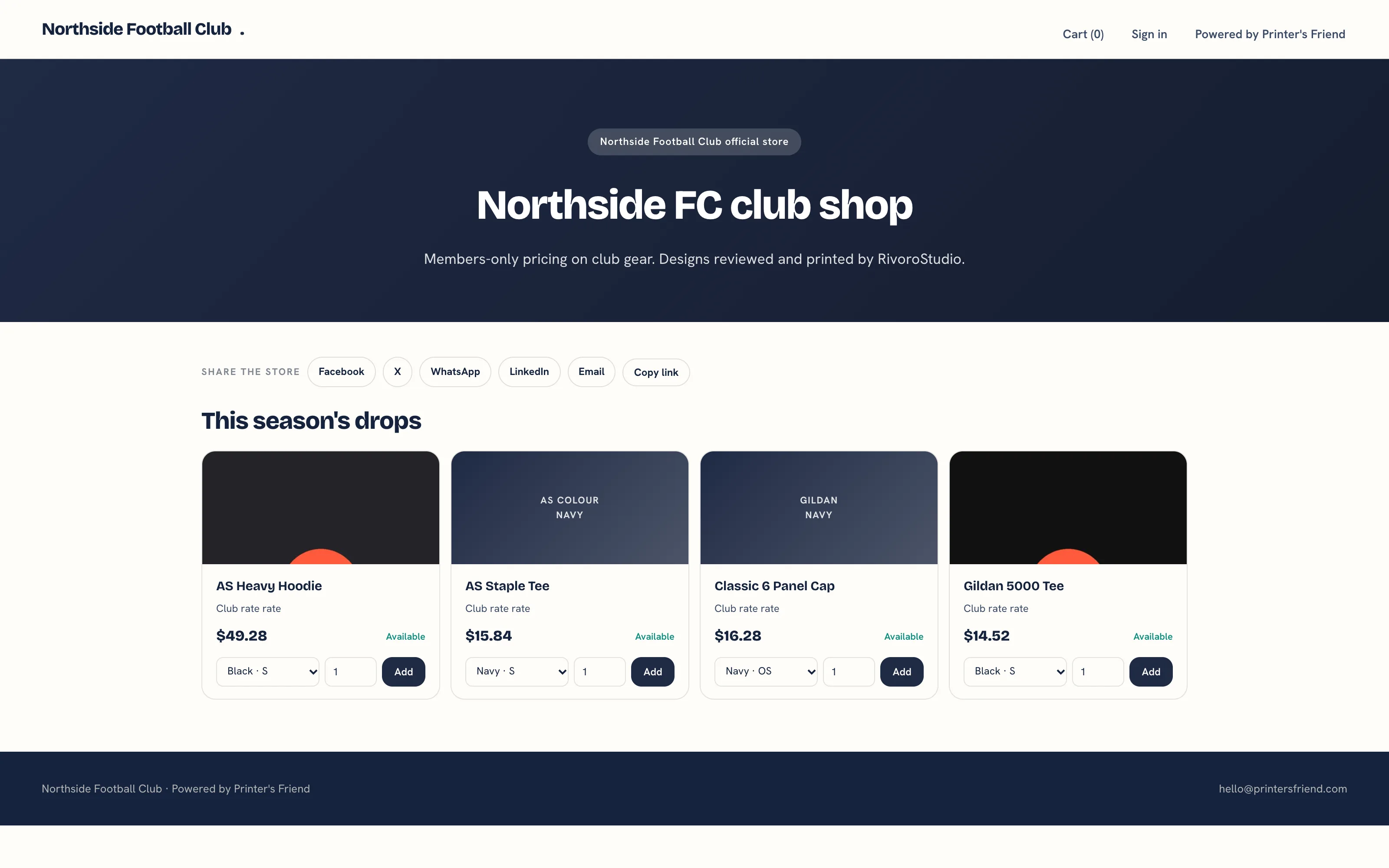 A team store, one of the five surfaces.
Which One to Use
| Customer | Surface | Why |
|---|---|---|
| A club or company that orders kit every season | Affiliate team store | Permanent, branded to them, priced at their price list, and they send their own members to the link |
| A one-off group buy with a deadline | Campaign store | One garment at one price, with a target and a close date on the page |
| Someone standing at your counter | Walk-in kiosk | They place the order themselves while you keep the press running |
| A trade customer with a login | The portal | Their price list rate, saved designs, reorders, approvals and invoices in one place |
| Anyone browsing | Public shop | A catalogue with a product page per style that sends them to a quote or a sign in |
What Every Surface Shares
- Prices come from the pricing engine: the garment's list price, the customer's price list, your pricing rules and the tax label, rate and currency set under Brand and portal settings. The one exception is a campaign, which sells at the unit price you set on the campaign.
- A store, campaign or portal checkout leaves a draft quote under Operate, then Quotes. A kiosk order lands under Operate, then Orders in the Artwork stage.
- The buyer receives a confirmation email addressed to them at the address they typed, and the staff who handle quotes and orders are told in the panel and by email.
- Guest checkout needs no account. When your Stripe account is connected, the confirmation page offers Pay now by card through a signed link that works for 24 hours; paying converts the draft quote to an order and an invoice and opens Stripe's hosted payment page.
- Orders count against the open order limit of your plan, and the limit is enforced with a message naming the plan that lifts it. A draft quote does not count until it is accepted.
Before You Launch Any of Them
- Connect payments if you want card payment at checkout. Without Stripe, the confirmation page promises an invoice by email and offers no card button.
- Import your catalogue and add product photos through the asset library. The store editor and the kiosk refuse to run on an empty catalogue and point you to the import.
- Check the tax label, rate and currency under Brand and portal settings. Every checkout prints them.
- Open each page on a phone before you share the link.
Related Pages
- Public Shop: the public catalogue at /shop and where a visitor is sent to order
- Affiliate Team Stores: a branded store for one club, school or company
- Campaign Stores: a group buy page with a target and a close date
- The Walk-in Kiosk: the iPad kiosk for counter customers and the orders it creates
- Coupon Codes: codes a customer types in the portal cart
- Promotions: automatic offers applied to portal cart orders
- Email Broadcasts: a marketing email or SMS to customers who have agreed to hear from you